
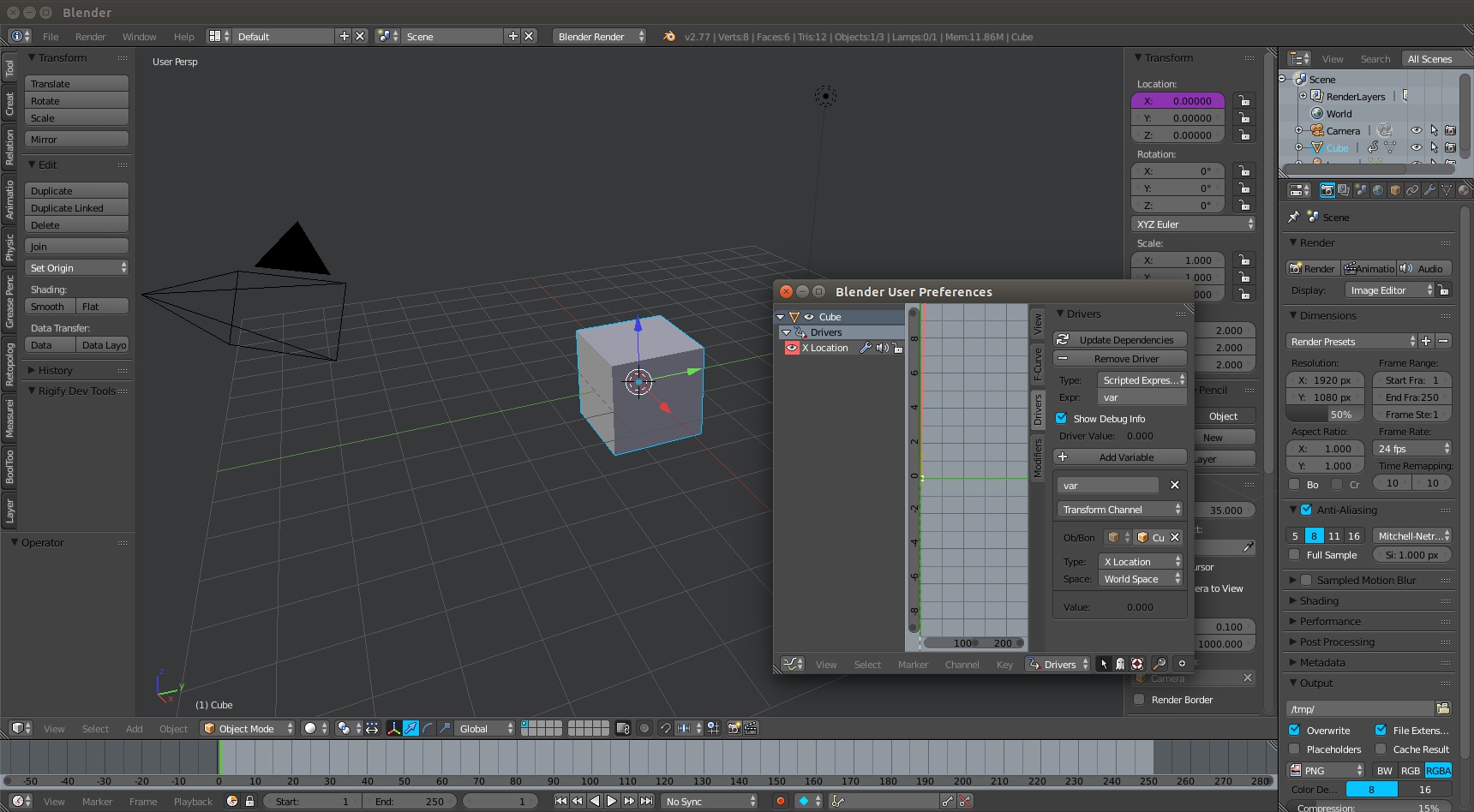
Pop-up window for editing drivers.
If you want to setup a simple driver, it can be a bit of a hassle because you have to go and open up the graph editor and switch it to drivers mode. But what if you could just right click on the field with the driver and click “Edit”, and then up popped the graph editor (see mock-up below) in a new window? I think there are other places that could benefit from pop-ups (a hotkey to pop-up the outliner?), but drivers seem like a good testing ground.
It's important to note that this isn't really a new idea, it's already in Blender in (at least) two places: The user preferences and the “New Window” display option for renders. The only difference is, with these new pop-ups the window always stays on top of the main Blender window until you close it (unlike the user preferences that can hide underneath the main blender window). This would prevent the user from opening half a dozen pop-ups and creating a hairy mess.
So really this proposal is two-fold:
- Do pop-up windows even make sense for Blender's UI philosophy?
- If so, they should be used for drivers.
It's also worth pointing out that just about every other graphics program uses pop-ups in some form (I'd say every, but I'm sure there is an exception).
I'm curious to know what other people think about it. Would this feature be helpful?
6 Comments
Hi; there is already the "Show in Drivers Editor" Button, at the bottom of that Driver's popup window. But, what I find that totally needs to be solved, and I believe relates with your proposition, is that this is not the Driver's popup window, is not the kind of window that the user wants vanishing suddenly: by just moving the cursor a few centimeters away from outside of its borders. This is so annoying, and I know it from Rigging in Blender, as the rigger needs to be constantly memorizing values, looking at data here and there from other Areas, Editors/Regions/Tabs/Panels, located in many places of the UI, even Clicking, thus it is very inconvienent that the Driver popup vanishes, by simply moving the cursor away from it and in uncontrollable way by the user --forcing the user to re-open the Driver's popup window over and over again, or forcing the user to have to open the Drivers Editor which is not always required.
So, I've made a new Request: link.
as monio said. in your example how is it better than creating a new workspace next-right to the 3d view, and seti it to drivers view?
Convenience. I often find myself putting off tasks that require changing the UI layout until I'm totally done in the current layout. It's just one less thing to think about.
sounds like an argumentation that hardly will convince a coder. on the fly 2 solutions come to my mind: Shift+click on the dashed corner of a driver window to "pop-it-up" as in your mockup, and better, add a screen layout and easily switch to it with the drop down menu or even Ctrl+LRarrows
This proposal is against one of Blender's UI paradigm: Non-Blocking Interface (floating windows that hide whats underneath). User preferences is one exception for this, new window for renders is just (non-default) option.
This is what the wiki says:
> Tools and interface options are being designed to not block the user from using any other parts of Blender. Blender doesn't pop up requesters that require the user to fill in data before things execute. The UI should stay responsive by all means, at least for the common and most used operations. When things exceptionally do block (while rendering or simulations) it should be clearly indicated and allow an immediate exit.
I think there are some subtle differences here:
And remember, this would be a totally optional feature, you would always be able to things the same way you can do them now.