
Type what modifier you want to add
- Open the add Modifier menu
- Type the name off your modifier narrowing the modifiers
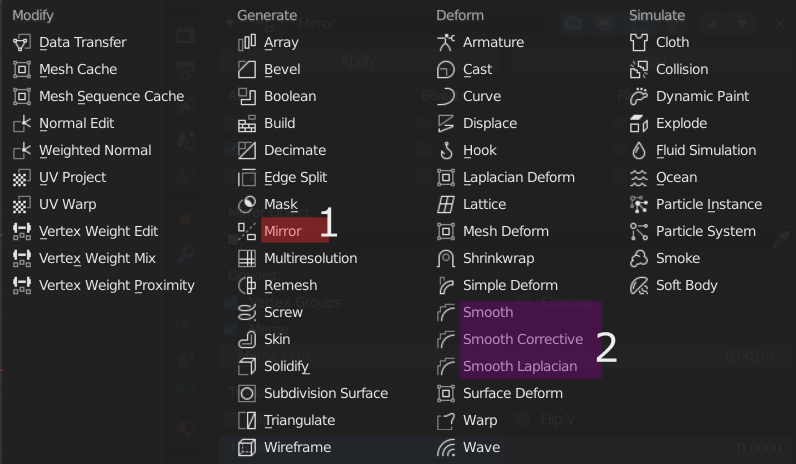
e.g.1) Typing "Mir" would show only(and select) the Mirror modifier
e.g.2) Typing "Smoo" would show Smooth, Smooth Corrective and Smooth Laplacian
10 Comments
SHIFT + A > MODIFIER
You can search/add favs in the Modifier List Addon. I basically cannot use Blender without it now. It also makes things MUCH more condensed/easier to look at vs. default layout, which looks terrible to me now. Although with the recent modifier updates/layout, it's slightly better...
github.com/Symstract/modifier_list
* @Matt L * same for me!
A properties search is being implemented :
But I wonder if we will be able to search for a specific modifier or it will only drive the user on the modifier tab
modifiers should be available in the search menu (F3)
I'm so used to this from UE4 I cannot rid myself of the habit, I start typing EVERYTIME I open the modifier list. Yes please!!!!
similar thing is there in 3ds max also....it is very useful
Those panels really should implement a search box which would apply to the armature modifiers/bone constraints. But yes searching through modifiers would be a long awaited and welcome addition.
i also like idea with fading other modifeirs while typing PIC
This should probably apply to all the add menus - press the shortcut to open the add menu, start typing to filter/search, then hit enter to select. Works great in UE4 and other software. I am aware that there are shortcuts auto-assigned based on name ito items in many of these menus (though not add modifier it seems), but just searching and hitting enter is usually more accurate and easier for beginners to understand and remember.