
Make Text Strip In VSE more advanced
If you need to add a lot of text into the video, then in Blender this becomes sometimes problematic, since in that case you need to add a lot of stripes with it's own individual text. It would be nice to introduce a function into the strip that changes the text.
The minus of adding one single strip for the entire video is that if something changes in the video itself, you will need to change the animation of the strip of text. But this problem can be solved by applying text strip to each video with its own individual text.
But you can ask me, then what is the point of such a new introduction. I will answer that even in that case, using a strip of text will be more convenient, just for this it will be necessary to find a balance where to animate the text and where to add a new strip.
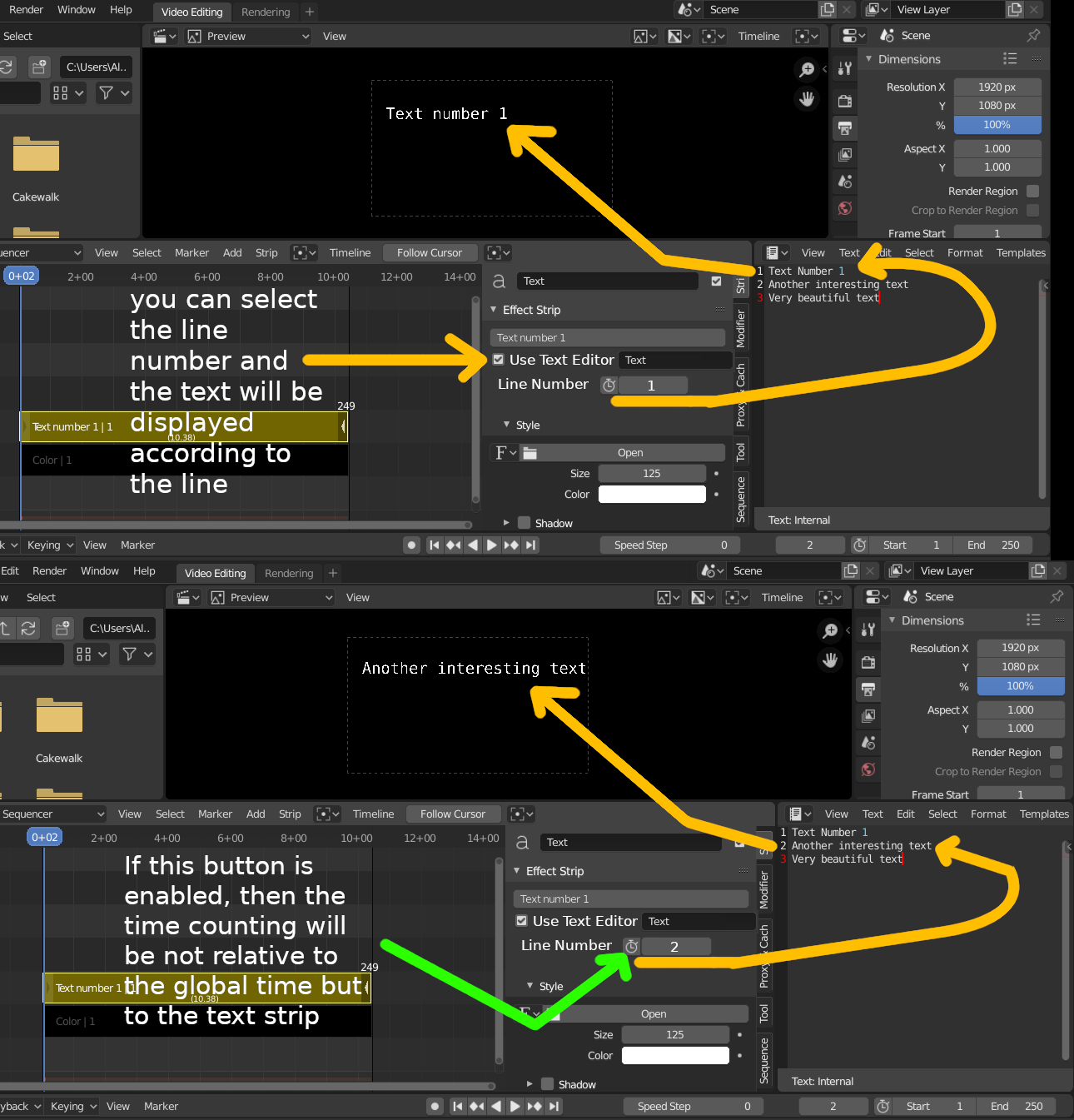
As an example, there should be a lot of text on one strip and thanks to the innovation it will be possible to add just one strip and animate those parts there the text changes.
This button in the form of a clock and next to the line number allows you to make the time counting not relative to the global time but to the text strip. This helps if you move the text along with the video strip, the moment when the text should appear does not change.
0 Comments