
Drop select Target bone in constraint bones
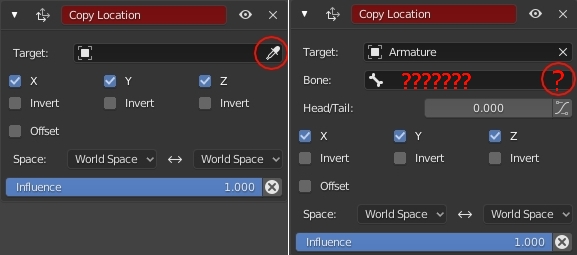
When selecting the Target with the dropper in the bone restrictions, only the object is selected. When the Target is another bone, only the Armature object is selected but the box where it defines the target bone is left empty. And there are no droppers in this box. This is quite inconsistent and confusing, in addition to being slow in the configuration of the Rig. I know that the keyboard shortcut "Ctrl + Shit + C" is faster, as this defines the target automatically. But in the case of Pole in IK restrictions, there is no keyboard shortcut and you have to manually enter the bone. I propose that the target bone be automatically defined from the dropper of the Target (the Target and Bone boxes) and also the dropper button is added to the target bone box, in all the selection boxes of the target bones, and in all bone constraints.
2 Comments
Yes this would be fantastic. I remember hearing Pablo talk about this on a Blender Today episode, and he said for some reason it is not a simple fix to implement, but that they would like to address it eventually.
Yeah, its a huge pain in the #$$ to find a correct bone.
I'm all in for this small but hugely useful implementation