
action editor > select all keyframes by channel
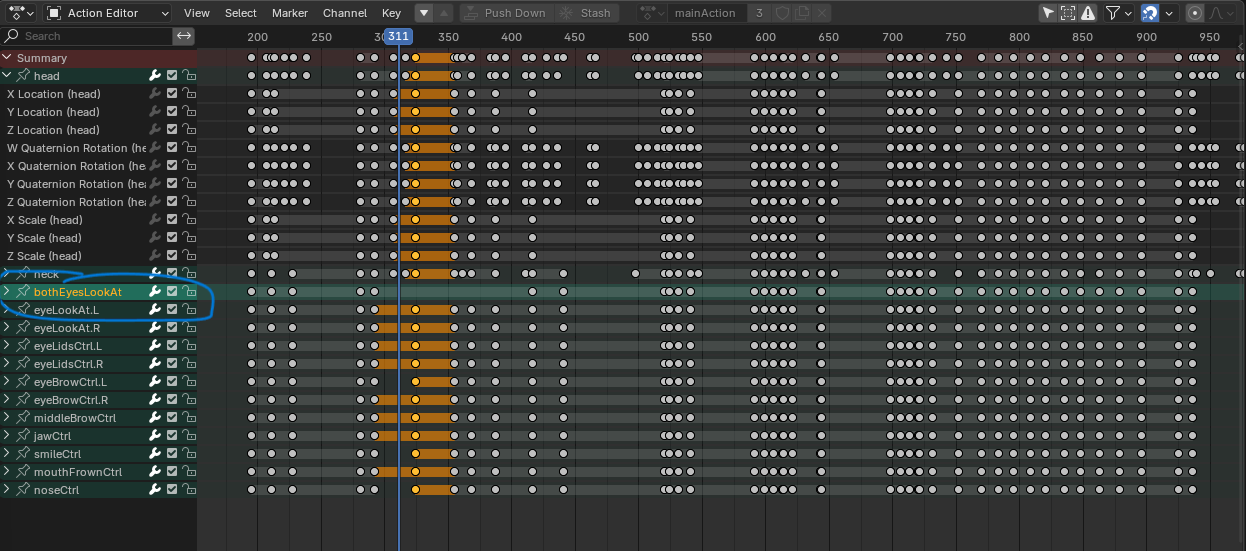
In the action editor, i like that i can basically make a quick "column" selection by clicking the summary keyframe on the dedicated "Summary" channel.
However i didn't find a way to make a quick "row" selection. The most obvious place for that kind of feature would probably be with the icons on each channel (see screenshot), and in the "Select menu".
The benefit of being able to row select all the keyframes of a given channel would be to be able to offset them all at once easily.
(without it, i currently have to first resize my zoom level to make sure all the keyframes i want to select are visible, then box-select them, which feels like not optimal)
1 Comment
You can already select a row of keyframes:
Similarily, use K to select the collumn of a key ( K ollumn... i guess...)