
Outliner: Display Collection, Object and Data user count
I've once again accidentally deleted a Collection that was used across multiple scenes—this is getting out of hand.
Blender desperately needs a clear visual indicator for Linked Data, Objects, and Collections in the Outliner. Here's why:
- I am almost certain that most users prefer sticking to the Outliner in Viewlayer mode without opening multiple Outliner instances (in different modes) as it really clutters the interface
- Blender's optimization features are fantastic for handling heavy scenes, but the Outliner's lack of transparency regarding linked data makes the workflow unnecessarily difficult.
- We should not have to expand the Object panel just to check if we're working with a Linked Object.
- We should not have to expand the Data panel to see if an object has Linked Data.
- And most importantly for Collections, we should not have to open another Outliner in Scene mode/Outliner in Blender File mode + filtered Collections/Outliner in DataAPI mode. That’s just too much of a hassle just to check that the collection being worked on is linked elsewhere
I've tried workarounds (even published my own extension: Show Object Data Users in Viewport )
Here is another pending one, specifically for the Collection tab in the properties panel: Enhanced Collection Tab
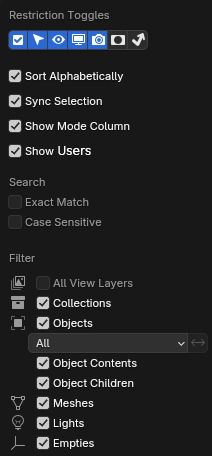
I guess all I'm asking is to include the existing User count icon (visible in Blender File/DataAPI) as an option that can be toggled in the Outliner while in ViewLayer and Scene Mode.
IDEA 1 - UPDATE THE OUTLINER
- The most straight-forward solution:
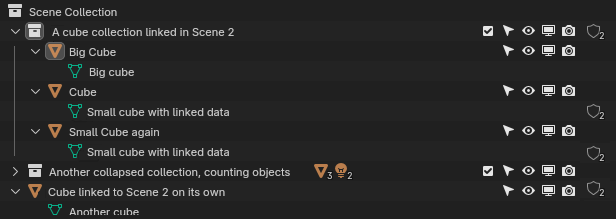
Alternative design:
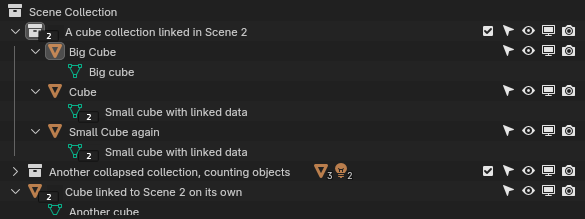
The idea being:

- To keep the Outliner cleaner, this could be toggled in the Outliner Filters:
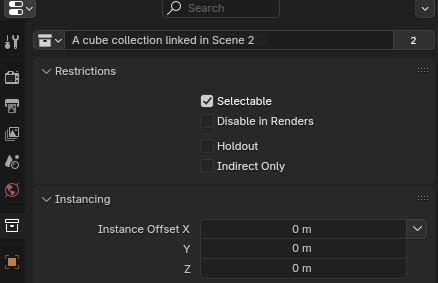
IDEA 2 - UPDATE THE COLLECTION PROPERTIES TAB
- I feel like Blender is trying to push users to handle linked collections as Objects
- currently, the easiest way to make a collection "single-user" using the Outliner in Viewlayer mode, without removing it from the entire file (right click > delete) or removing it from the current scene (right click > unlink from scene), is by duplicating it (+ right click the original Collection > "Unlick from Scene" for extra safety)
- easiest solution: mimic the Object Properties panel, showing "User" count next to the Collection name. Clicking it should make the Collection single user
If you have other suggestions, feel free to share.
1 Comment
Yes.