
Better pie menu
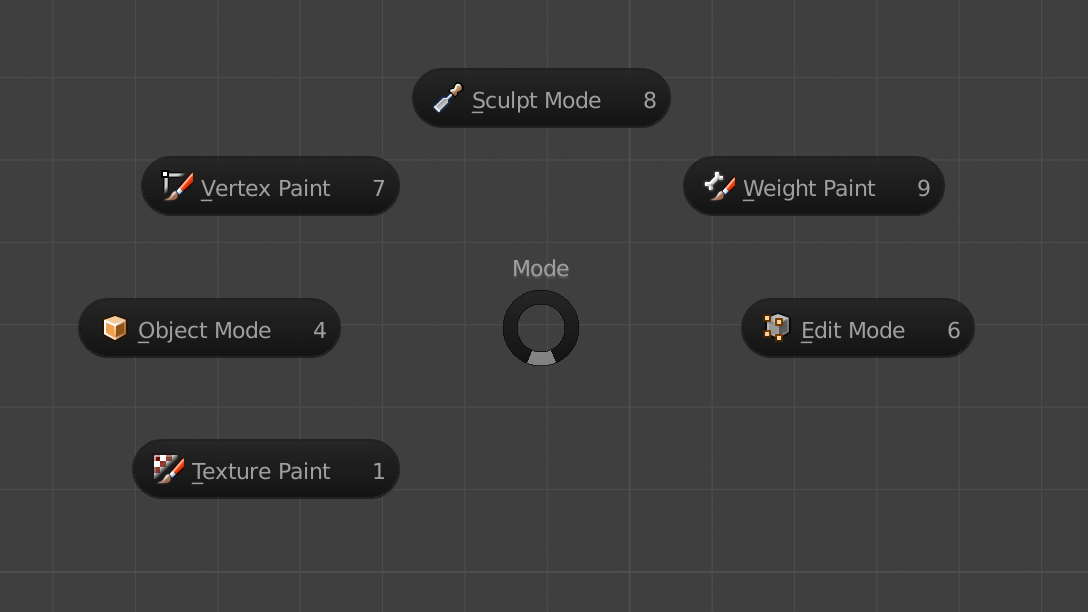
I propose to make some changes to shortcuts. I think it will be much faster if pie menu for editing modes are changing when You press just Tab. If you press Tab you immediately change mode from Object to Edit. If you hold Tab then Pie menu is activated. The same for Z. If you press Z then you change solid to wireframe mode. If you hold Z then Pie menu is activated. Basically if you press and release the button and not move the mouse anywhere or not achieve any option it just activates default operation if you press the button and in the same time move cursor to one of the option it will change to that option. I think it will make work much faster. Thank you.
5 Comments
I like Pie Menu with press "Tab"... But what i hate is "Ctr + Tab" for changing "Vertex, Edge, Face" is missing :)
@Vincentdecc: Yes, it's a real problem for people using laptops without a numberpad.
@jfraserm: You can solve this problem! Blender now uses 1, 2, 3 for changing between vertex, edge and face select mode. I find this a lot more useful than having "emulate numpad" on.
So for changing the views, I activated the add-on "3D Viewport Pie Menus" and checked "View Numpad Pie: Hotkey Q" in its settings. Now when you press Q, you have a pie menu with the different views. After a short time you get very used to just pressing Q and flicking the mouse in the direction you want. I even use it when I actually have a numpad now!
Of course you lose the new "quick favorites" menu in 2.8 (though I’m sure you could remap one of the shortcuts if you want it) but I don’t use that anyway since I rely on shortcuts.
Just set Z to solid/wire at CLICK event. Set Pie menu to Z at CLICK DRAG event in prefs Done!
So when you press just Z, got solid mode. If you press Z and move your mouse - Pie menu will appear. not The same you want, but I use it for a month and it's pritty handy for me
@huggaida: Yes. it's not exactly what I mean. But your solution is also good. I think if this is default setup it will be much better. Thank you.