
Unique render settings for each component of Blender
I've been really focusing lately on trying to get a full workflow within Blender. sim -> comp -> sim variation 2 -> comp to compare... etc.
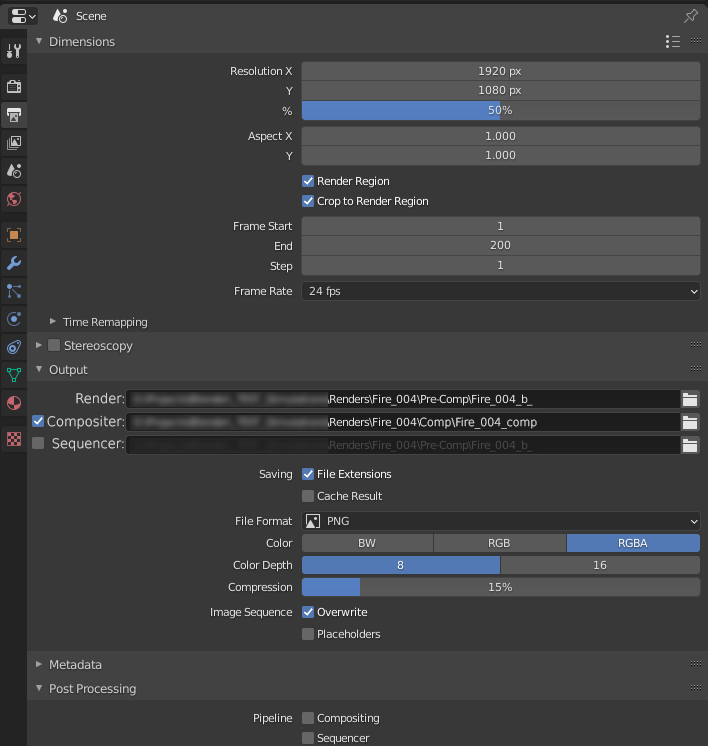
The problem is that all the components share the same render settings. it would be great if each component would have it's own unique render output settings. The current setup requires you to make sure you rename it every time you go back and forth to make sure that you don't clobber one or the other. This would be ideal for many test renders before final output.
6 Comments
make a linked scene then you can have different render settings in each.
Hopefully one day when we have everyting nodes, render settings will just be a node. This will allow multiple render settings nodes to be connected to one scene node. Then each render settings node output could lead to a different node, eg a comp node 1, comp node 2, comp node 3, file out node...etc. Result would be node driven batch rendering of different render settings and compositions.
* @3d illusions * that's an interesting solution. I'll try that out. not very UX friendly though.
* @3d illusions * and yes. i agree with the output nodes. i tried this approach already but they're missing parts of the output settings and that pipeline only exists in comp, from what i can see.
Ideally Blender would have it's own dedicated Rendering section component that is linked to each component of the toolset.
possibly also multiple export formats, like if you press F12 + 1: that is render settings 1. And Ctrl + F12 + 1 is animation render settings 1.
so i tried the idea for linked scenes. the problem im having with this is that certain modifiers are not working in linked scenes.... but only when rendered with Cycles. It might be all modifiers. I'm still testing things to make sure it's not me who did something wrong though.
ok, i got it to work. setting boolean objects as wireframes doesn't translate well in linked scenes. i need to hide the props entirely for the link to have them not display.