
Scroll wheel in object picker eyedropper
The Object Eyedropper tool (used in parent, constraint and modifiers) can not be used to select an object that is obscured by other objects, even if x-ray is enabled. I commonly need to select an obscured object when using the Boolean modifier, and need to resort to picking it from the drop-down list.
I also noticed that the scroll wheel has no functionality while the Eyedropper is active.
I suggest that the scroll wheel should cycle through all the objects under the cursor. This would be intuitive, since the name of the object is displayed next to the cursor.
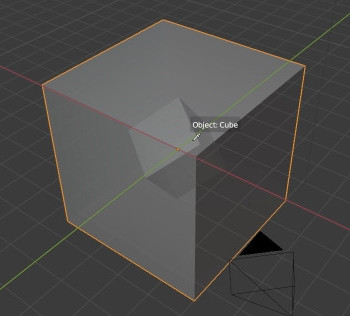
Example of completely obscured object:

3 Comments
+1
You can always use the eyedropper tool to pick object directly from the outliner
* @Shimoon * Cool, I didn't know that! But this doesn't seem much different to picking from the drop-down list; in fact, I can't even scroll the outliner while doing this
* @maze * Its indeed quite limited, still nice to have but limited. I like your solution better!