
Pose Library / Actions : GIF thumbnails
Suggestion for next time there is a lot of work on Pose Library / Actions / NLA_Editor:
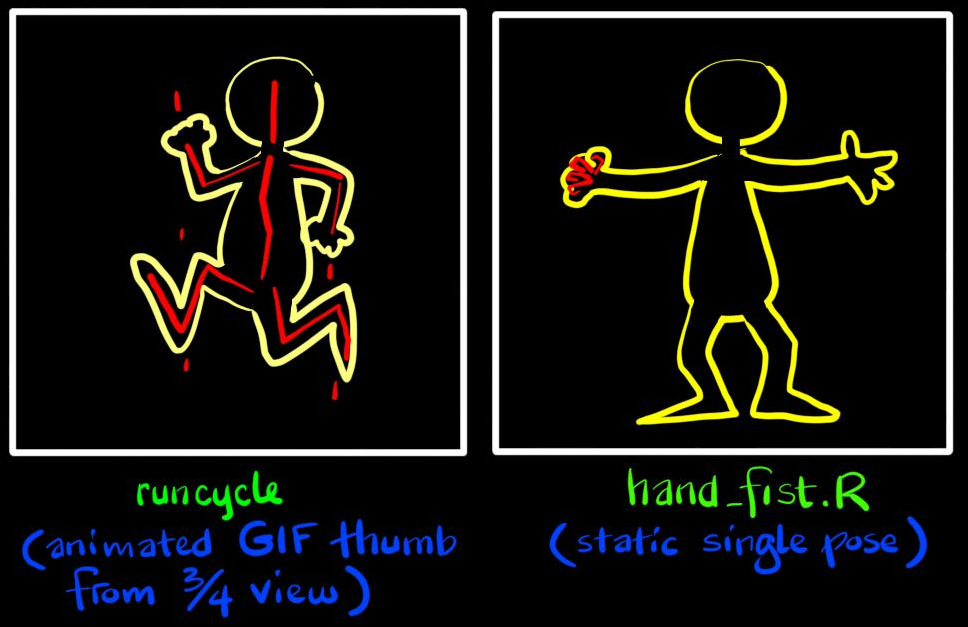
Please develop (animated GIF) thumbnails system for Poses and Actions. (See my attached image.)
From a character model, generate a very small thumbnail consisting of the Outline (yellow, as already used to show selected object in 3d Viewport), then draw which bones are involved (red, using "stick" bone armature display mode). These software bits already exist, need just add logic to create & manage tiny animated GIF thumbnails, and to link them to the Pose/Action data-blocks which they represent.
For Actions, use a standard 3/4 view angle, as a best guess.
Using the File_Browser space of blender, create a new mode to browse Actions and Poses. Action cycles would be visible at a glance as Walk, Run, Jump, etc. Display the thumbnail as an icon with the name of Action/Pose just under it. Try to keep usage paradigm parallel to normal file-browsing.
Because Pose_Library == Action: double click on a Pose_Library to see individual static poses (as if in a sub-directory). At this level they would not be animated, but all else would behave the same.
Then implement drag and drop to apply these to an armature in Pose_Mode, or onto a strip in the NLA_Editor. Depending on scale used to display the NLA_Editor, it would be nice if these same thumbnails could appear on the Strips -- at a glance one could see which cycles (walk, run, etc) were happening when.
Thank you for blender!!
1 Comment
In some softwares proposing animation assets, there's a form of playback, kind of on cursor hover. Often it starts playing after a short delay (to prevent unnecessary playback when you're just moving your cursor around). Some other will combine that mixed with a kind of timeline effect : the horizontal position of your cursor on the thumbnail is like a playhead on a timeline.
Though to keep things as less resource intensive as possible, it's never more than one preview at a time, no gif (just still images loaded/unloaded dynamically as needed) and it often relies on the user to make the thumbnails (or at least chose the camera position so the software generates everything from it).