
Extrude along curve / path
Hi!
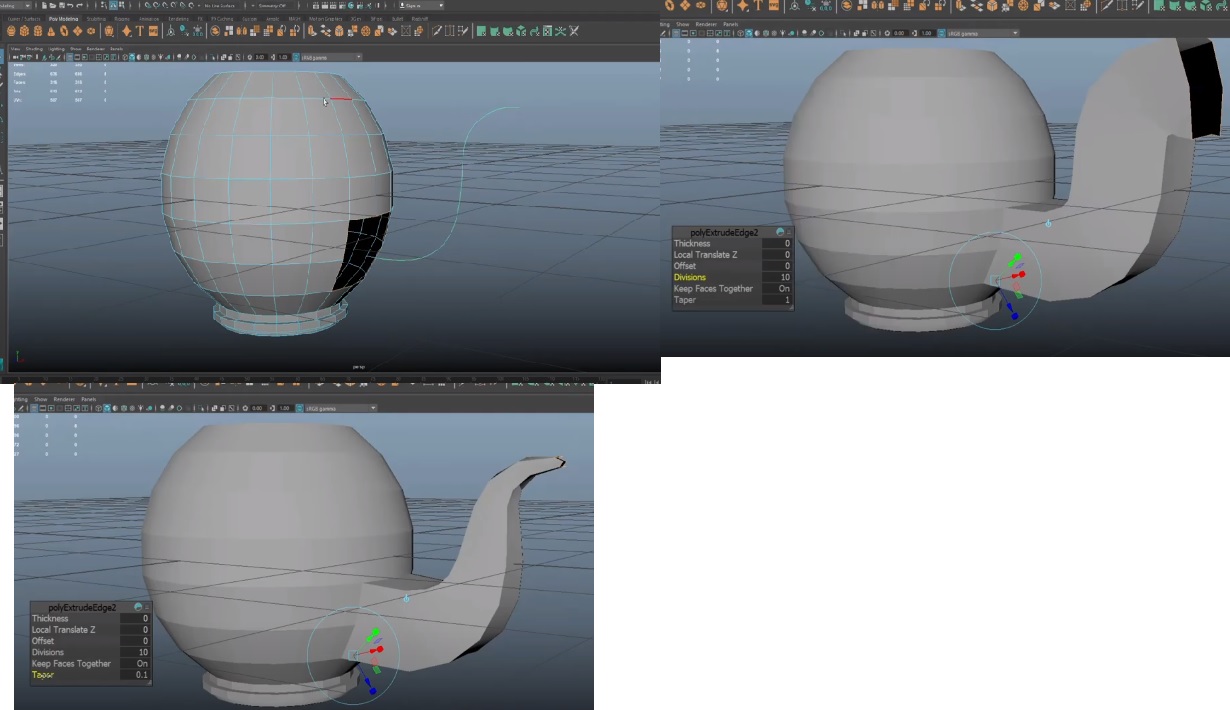
In Maya, the user can select an edge loop, for instance, then select a curve and make an extrude. Then, he can even update some extrude options such as the number of "divisions" and the "taper" value of the new curved surface as well.
This would be a really cool extrude option in Blender.
7 Comments
This is super essential imo. Of course, for simple face extrudes converting a bevel/depth curve to mesh is possible in blender but with a lot of manual alignment involved to get it to match the face normals. Allowing users the capability to bridge faces with generated curve controls would be huge. Especially for complex topologies. Number one requested feature for me
it is great for designing some cool architectural stuff ....is there any pre existing addon for it
* @arkoprobhogupta23 * you can easily do it with curves it self. and then convert it to mesh. not a big deal in my opinion.
* @aslan.tamjidi * Blender is infamous for nurbs and curves...
This is a few less steps than the way I would do it in Blender but it isn't really something blender can't do quite easily. I won't downvote but I'm not convinced to give an upvote. Could you post a video of the Maya way versus the way you've been doing it in Blender?
* @thinsoldier * Thanks for your time, buddy! The thing is, right now in Blender i need to select the edges and extrude manually every "division" (ctrl + RMB) in ortho view, adjusting the rotation and scale as i go. Is there a easiest/better way? In Maya, you select the edges and the curve then simply hit extrude. Adjusting some numbers in Divisions and Taper do the trick and the geometry we get is very "clean", following the curve perfectly.
* @cfree * I created the curve, used the geometry bevel setting of the curve. Drop resolution to zero to get 4-sided geometry. Enter edit mode of the curve and ctrl+t to twist the curve so the geometry lines up with the quad faces on the sphere. Go to object mode, right click, convert curve to mesh, select both sphere and mesh and ctrl+j then merge verts between the sphere and the curved mesh. I have maya installed and I used it every day for most 2018 (and it used to used it a lot back in 2004-2012) but this particular example didn't compell me to open maya because the steps in blender are harder or greater in number. It's not, in my opinion. The maya way only allows 1 taper (can you taper towarads either direction or both at the same time?) whereas the Blender curves can be tapered/scaled at each curve point individually (alt+s) and this works in conjunction with the Proportional Editing feature so you have the possibility of much more control over your taper.