
Specialty tooltip for property tabs
It can be a bit hard to pick the right property tab; a problem made a more challenging by the colorless icons and changing icons in some places (like lights). I have an idea that would potentially help, but might be a bit tricky to implement. The current tooltips are not ideal. They have a delay per-button, and they have the exact same python information for all buttons (if Python is on).

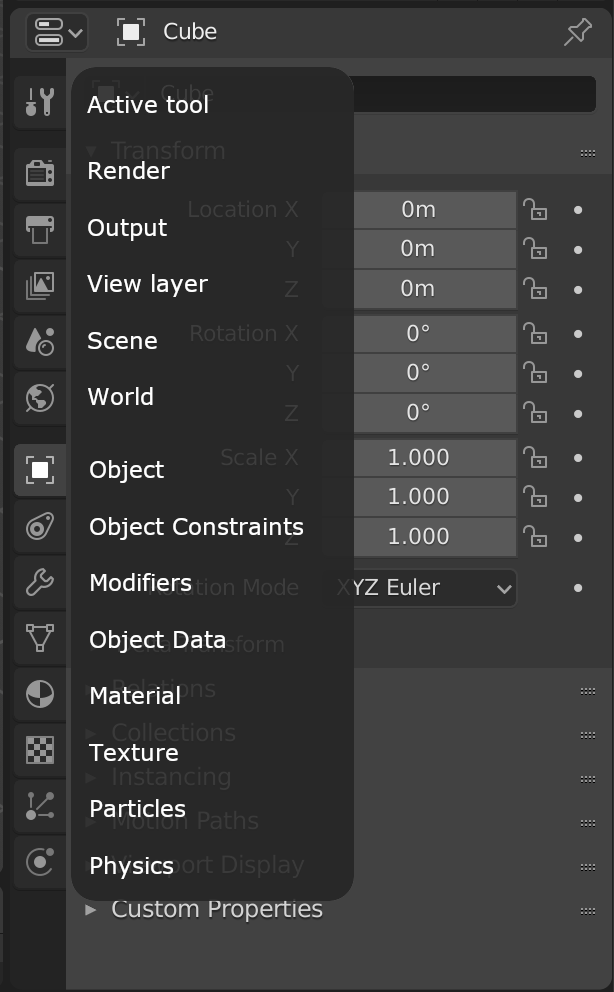
Instead of the normal tooltip popping up when mousing over each button (with the delay each time), what about if all the names popped up to the left at once? Maybe like this mockup:

5 Comments
It could work, but only if it's implemented in a way that doesn't interfere with quickly getting to the actual content of the tab. So basically, the "tooltip" should only appear when the mouse is in the Navigation Bar. As soon as it moves out of it, it should disappear. Otherwise it's just gonna be a bother to everyone.
@Alexander Chaplin Braz: Yes, the idea would be to make it a normal tooltip. Just aligned and with several buttons at once. And the whole tab button area should be continuous, you shouldn't have to wait like you do now if you move up/down to a new button.
Good idea. However, having the textes hiding the controls in the panel is not welcome. I suggest to put this tip on the left side of the tabs to better see the content.
@pcsd24: That would look a bit odd, would need to be right-aligned, and generally is not where any other tooltips appear. Your eyes are trained to look to the right for a tooltip by the OS and by the rest of Blender. I think it's okay to cover up the buttons like other tooltips - there still is an overall delay so it won't pop up instantly. Some transperency like the current tooltips is there, too.
Very good idea! I like it.