
Make it possible to have a separate window stay on top
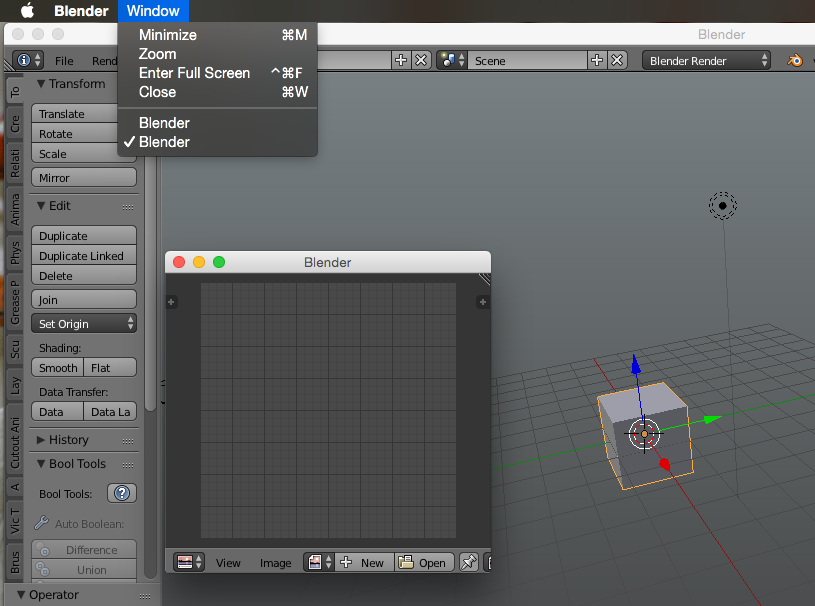
Currently, you can open any panel in a separate window by shift-clicking on the top right corner. This is great, but it should be possible to have this window always stay on top. On Linux, many window managers have this feature built-in for every app already, however on Windows and macOS this is not the case. It would greatly enhance the functionality though, because it’s more versatile than adjusting the UI manually.
I don’t know how other programs integrate this in Windows (I guess usually with a right click on the window frame?), but on macOS, there is already a "Window" menu in the menu bar in Blender. I’ve seen many other programs use the "stay on top" option in exactly that menu, so it should not be complicated to add this.
10 Comments
Please no floating windows !!
@darkstarmail: It would only be an option available in the window manager. It wouldn’t change the way Blender works for anyone who doesn’t need it. However, if you have limited screen space, it would come in very handy.
* @Lloyd Almeida * only as an option ...
* @Lloyd Almeida * no constructive comment!! could be an option
no no no floating windows is a pain in the ass! When there are floating this means all of them need to be dragged and moved, either separately or as a group. It's super annoying. Have you worked with design applications? Well the GUI which is on the side and hides with pressing tab, just like shift+space does for blender, is way more user-friendly.
Go check Sketchup on OSX, all floating windows. I got a script which hides all panels or shows them just like shift+space. Without that your non-stop moving panels around to view you actual cause of interest.
Floating panels isnt the way to work, go check some info on that
In addition, i think it would be very useful to setup a base file with a better layout to your likings. I made a setup with some items i like and have a script which i converted to an addon for switching the layout without ctrl+arrows. Because this is used by the system and i prefer to keep 1 hand on the keyboard and one on my Wacom pen. Now when i want to switch layout i can press cmd+1-5 to switch between one of them.
Below a quick screengrab of this. If you like it or want to try it, let me know. Its super handy!!
Dont want to be a A-hole here, just some advice. Ive been doing design for 20yr and using apps, i got quite the experience with GUI and UIX.
@romboutv:
Well, I had this idea about the floating window because it would be an easy fix for the reference image problem I talked about in my other post .
I don’t see any harm in having that option available for a window you manually pop out (this function is available already anyway). Would also be handy if you want to keep a Blender window floating on top of a browser window for example, if you want to follow along with something. I mean, you could open ANY panel that blender has in a floating window – even a text panel to take notes, in 2.8. you could use it for 2D drawing along with a reference you have in your browser or elsewhere, without having to adjust your whole layout or your other windows.
I agree that floating windows are not great for a whole workflow, but I think just having the possibility could be handy in many ways. If it’s in the menu bar or a right-click menu in windows, it wouldn’t bother anybody – in fact, people don’t need it wouldn’t even notice.
Your scripts seem quite handy though, especially the one for changing layouts! Would be interested in that one. Ctrl + arrows is quite unhandy, as I use those controls for switching between virtual desktops (which I think is the default of macOS, but I’m not sure).
* @romboutv * only as an option
* @Fjodor F. Fjodor * Why nut use a image window for that? There are quite some addons which also do what you want. You could always use PureRef which is AWESOME. You can add as many image there and move, pan, scale rototate. DO what every you want, that image will ALWAYS be on top and you can set to ignore mouse hits.
Here is the solution: github.com/scottjwood/Window-always-on-top
Best would be like a little nob or checkbox on top of the window to fix it there.
But I rather have it right now than cinema4d does it for example and just pushes every other window on top which can be very anoying at time.