
Option to Lock Individual Orthographic Views
Objective: Add "Lock" option to properties panel for individual orthographic views.
Issue: I flip back and forth between various views while modeling (I don't like the quad view modeling screen), and it seems if I even look at my mouse the wrong way or my finger slips, it immediately rotates my view back into perspective view.
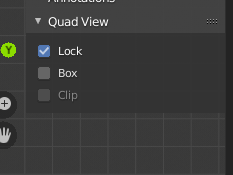
Solution: Add the exact same "Lock" option to the properties panel that is currently available for the Quad View (see screenshot) for each individual orthographic view (front/back/right/left/top/bottom).
4 Comments
It seems blender has the functionality already: gist.github.com/Fweeb/bb61c15139bff338cb17
It's simply a matter of the devs placing a button for it.
I tried the add-on (linked below)- unfortunately this isn't exactly the functionality I was hoping for either. It does lock the current view, but it won't allow you to switch out of that view unless you disable the feature, so it's almost more trouble than it's worth. Not really sure why it acts this way- oh well...
if i understood your problem correctly - i suggest using this addon - evgeniyzaitsev.com/2012/05/29/3d-view-toggle-views/ . it snaps (by hotkey) to closest orto (left? right? top...)view and lock (prevent it for) viewport rotating till next hotkey click. also u may modify it a bit to return not into perpective but into orto view..
* @impacman * Thank you for the link- yes this is does contain a solution for the locking issue, but it appears this is strictly a toggle between the current user perspective and the "closest" orthographic view. As I like to immediately jump from the various orthographic views via my numpad keys, this would take more time/UI manipulation to different ortho views and still have it locked. That being said, I could probably get used to this add-on as a stop gap.