
Add sub-nodes to search fields in the Add menu for things like Math and MixRGB
Due to the high volume of nodes in Blender, a convenient workflow is to rely heavily on the Search field; typing Ctrl A, S, and Set is a quicker way to find the Set Material node than actually navigating to its location in the Add Node submenus.
The problem is that many nodes are actually a collection of subordinate nodes. For instance, the Math node immediately offers you a pulldown to choose Add, Subtract, Multiply, etc. When you select one of these options, it even changes the node's name to the chosen operation. This can cause beginner headaches when replicating nodetrees from tutorials; you might go hunting for a Modulo node, not knowing it's a subset of Math.
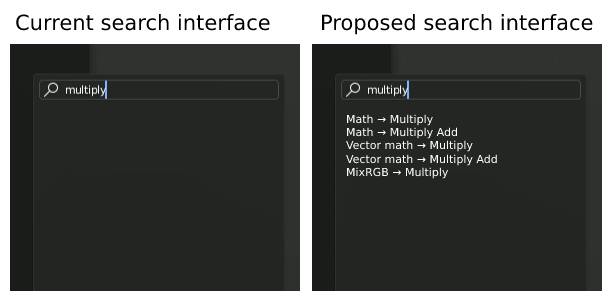
My proposal is to include subsets of nodes in the nodes in the search engine. This would mean that you can search a term like Multiply, and nodes with a multiply option would show up. This would also be more in line with the current node convenience of pulling out an input or output and choosing a new node from a list; doing so includes node subcategories.
4 Comments
Same issue with filter node in compositor - bunch of very different operations in single node what can't be searched.
This is allready implemented when you drag off a node. They said that it would be transfered over to the normal search as well.
Done in 4.5: User Interface - Blender Developer Documentation
this bothers me so long now that I made a request in the blender monday livestream to ask if this could be implemented, they said that the community should develop this due to limited resources in devs working in blender
so... guess we will have to wait till some awesome community dev picks this up :/