
Panel to Manage Materials
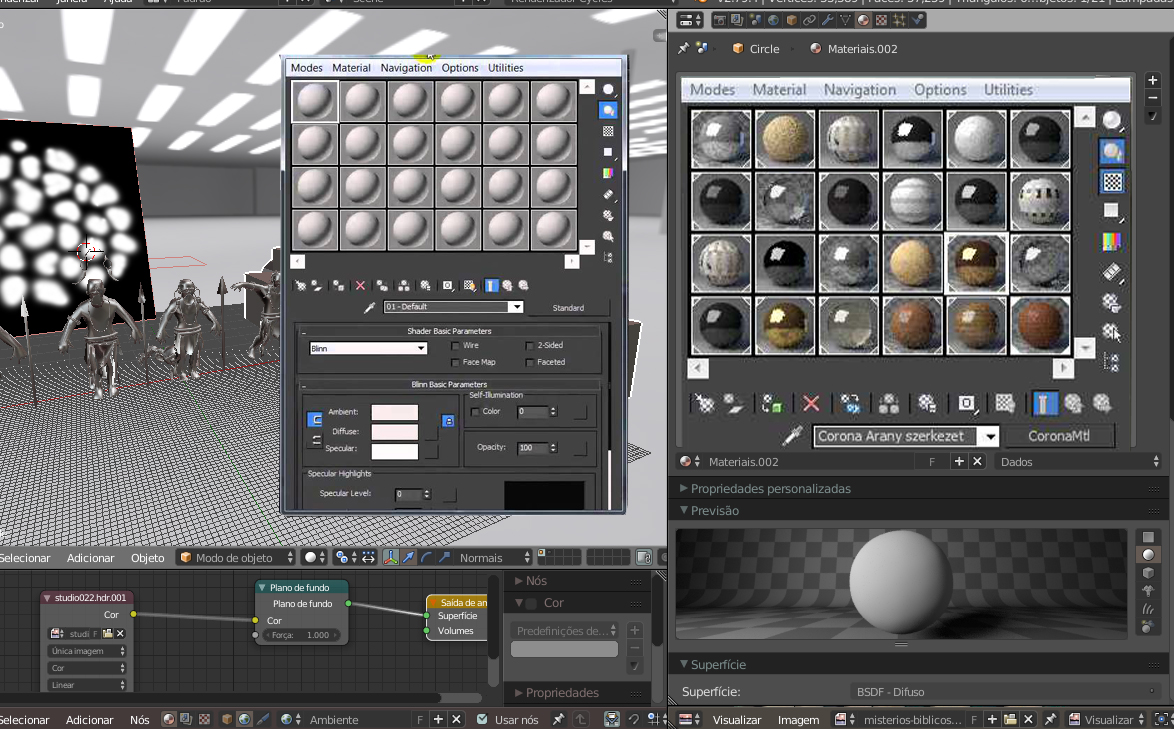
Any modeling program has a panel with large icons for materials for configuration and with option to delete materials, such as - corona render-- maya - 3dsmax - zbrush - etc; only the blender that does not have; all the programs there are lists of materials ready that you lower of the net and only adds in the blender it is all manual you have to create from scratch all materials without icons to choose and without option to delete the materials or that is saved in the definitive in the blender - - or could also incorporate floating panels to manage materials
5 Comments
The big problem I see in Blender materials is they lives inside objects instead the option to create materials freely, and then, having the chance to just drag to any object /subobject you want. This is easy in Max, Maya, XSi and many others. Other thing could enhance node editor should be having Tabs.
3dsmax doesn't show all materials, only the 25 first I think.
this is why some 3dsmax users yell at it ;)
@loic.dautry: Man I'd hated 3ds compact mode! My lecturer would teach the class applying materials via this mode and I would always switch back node mode xD. I found it funny each time I inquired about materials, he would get annoyed and switch it back to compact haha.
Which is 25 more than Blender shows.