
Screen Space Curvature in Workbench Engine for better surface detail visualization.
WHY WE NEED IT
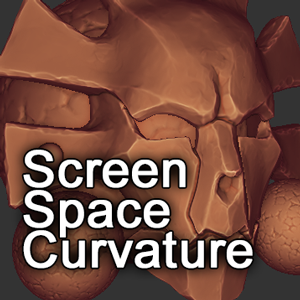
I'd like to propose adding Screen Space Curvature overlay post-process. It's main purpose is Sculpting Mode where typical shaders aren't enough to properly visualize high-frequency surface details. Most of sculpting apps include such feature. Take a look at this example:

Currently we can achieve similar effect in Clay Engine using Edge and Cavity sliders. It works good but require a lot of computation to produce noise-free image needed for visualizing small details. This isn't optimal for sculpting which already is heavy task for GPU. I propose to add lightweight solution. Mind that current approach from Clay Engine and mine can work in conjunction. The first one will be perfect for large and medium forms (using fewer samples) and the second will bump up high frequency details.


HOW IT WORKS (TECHNICAL)
My solution is based on Prewitt Operator , a common image processing technique used for edge detection.
- First we need View Normal render pass.
- We sample it four times, with one pixel offsets in four direction.
- Red channels from images shifted left and right are subtracted.
- Green channels from images shifted up and down are subtracted.
- We add everything together.
Now we have image where flat areas have a value of 0 , concave are -1 and convex are 1 . Before overlaying it onto Viewport it needs to be remapped, flat surfaces should have a value of 0.5 . We can remap it to ( 0, 1 ) range using mix(0.5, 1.0, a) function, however we should increase contrast here to let users amplify curvature effect. To get image in ( -0.5, 1.5 ) range we don't need to use mix() function, we simply add 0.5 to result of Prewitt Operator.

Calculating curvature is almost done. You may notice strong outlines on object silhouettes. This is caused by step changes in normal values. They are distracting so we need get rid of them using 2 methods:
- Find and exclude object outlines using Object ID render pass and modified Prewitt Operator.
- Find and tone down extreme concave areas in curvature image.
Together they will generate a mask we can use to mix our curvature and neutral 0.5 value. Finally we composite refined curvature image with Viewport using Overlay blending mode. Blending factor should be exposed to users in shading Pop-over and have default value of 0.5.

This node graph below shows whole curvature shader. It can be implemented with few lines of code and will work super fast. I combined View Normal and Object ID passes into one image to reduce texture samplers. Feel free to download and play with .blend file.
 Blend File
11 Comments
I am looking for the up vote button frenetically. But yeah, this looks great. Would help visualize details a lot when sculpting. Hopefully Clément can come to the rescue. This would be neat feature for 2.8 sculpting.
According to todays dev notes this was added to 2.8? Author should probably check that the added feature matches the request and then mark the request as either completed (or whatever the status might be)
* @3rton93 * Agree. It should be marked like Done.
* @ Vyacheslav * Seems like they do now
drive.google.com/file/d/1ZDmvNftvhfVOd4pz1uUGQnVSIvb3arBe/view
and would be cool if this feature use as stencil mask when painting in 3d. check this post and upvote if like it.
blender.community/c/rightclickselect/xJbbbc/
shader code here:
madebyevan.com/shaders/curvature/
* @blendswap001 * hi, were you successful in achieving the curvature effect in blender using this code?
Very good proposal.
Can't this be archived or something
Hello, sorry for my rudeness, but i want to ask about my problem, i checked the whole internet and i couldnt find an answer. (When i press on cycles render, blender stop working instantly and crash immediatly??) If anyone have a fix for my glitch/bug please contact me.
Man, this looks so good, they should let us bake it into textures while they're at it!
very nice feature proposal