
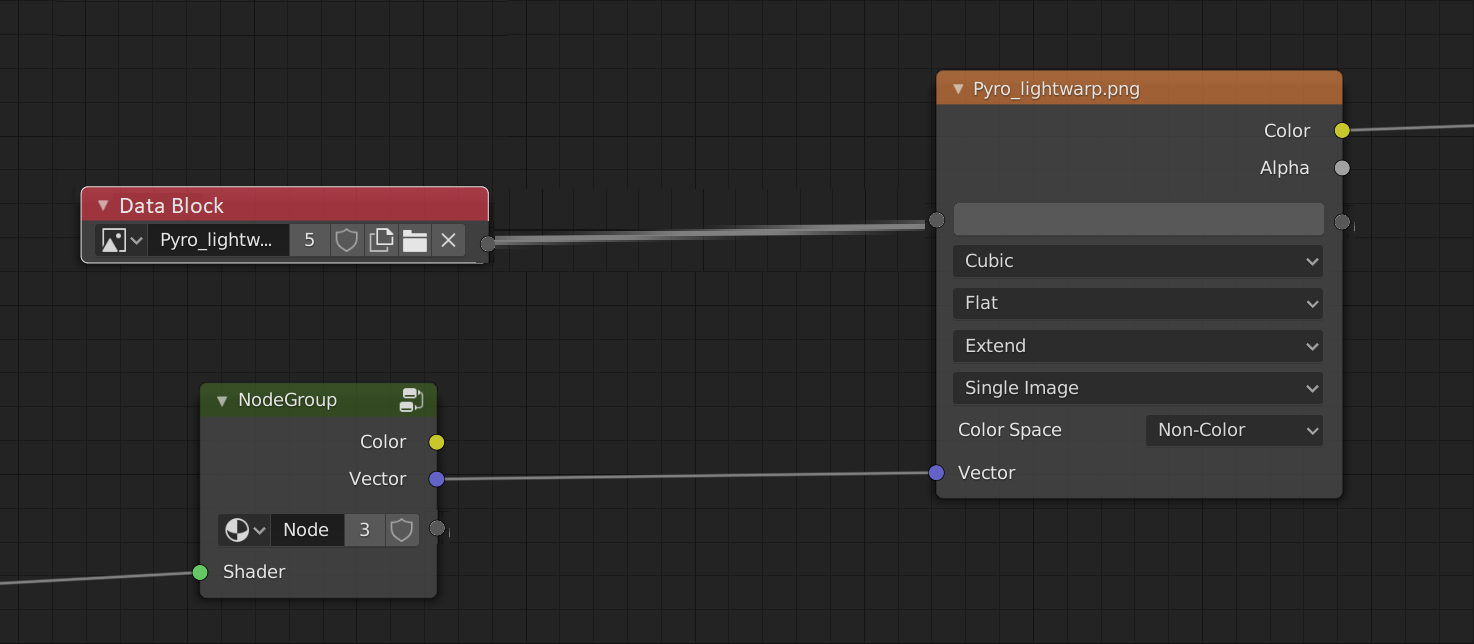
Data block node (and IO sockets on nodes with datablocks)
Sometimes I need a way to affect a texture later in the chain then when I choose it. The most common use would be to vectorize a texture but still maintaining it as a primary input. I've cut up an example of what it could look like (but this is basically just concept art of how it could work)
I'd be content with being able to remap a texture or color field from a vector, however transfering data blocks seems like the most intuitive way to do so and bring in lots of possibility. It just feels very blendery
I'd like to point out that in my mind every selectable data block can be a source, enabling for datablock passthrough potentially. This would make the datablock node as an input kind of redundant as any node with a datablock can be a source, however I like the idea of both. (In the image I forgot to add a datablock input on the NodeGroup node, pretend it's there)
Now I know that diffrent datablocks don't have the same parameters and that could cause serious conflict, but imagine a NodeGroup with all the same inputs as an image texture but that behaves differently, it'd be worth keeping compatibility for that. The best way I think to implement cross-datablock-type compatibility would be to use socket names: identical socket names would be 'overwritten' by the datablock input, and sockets on the end node without identically named sockets on the source node would just remain bla(n/c)k
If this is already a thing or there are ways of achieving this, naturally please do tell me.
13 Comments
That would allow node groups with image texture input
* @-L0Lock- * indeed
Nice, but I'm a little skeptical about that any-datablock into any-datablock connection.
* @ Lsscpp * I know it adds a complication, but I only see 7 potential data block types that are natively in the nodes, maybe adding the "camera" datablock though it probably would work with object (as all objects can be made cameras) it would make no sense to plug an image datablock into an object one, yes. there would be no way to interpret it.
But it is possible to plug a BSDF into a mixRGB, it just shows up error red. what about showing that crossing types doesn't work in the same way. Admittedly a lot of those would not be very useful as they have no input and few (relevant) outputs but this kind of flexibility is what blender is great for !
I do realize that the shader editor is not the only node editor and there are more datablocks available
Admittedly a lot of those would not be very useful as they have no input and few (relevant) outputs but this kind of flexibility is what blender is great for !
I do realize that the shader editor is not the only node editor and there are more datablocks available
* @syborg64 * Yes flexibility at the cost of let the user making a mess. It is already possible afterall. Who knows... Everything nodes project is in Blender's future. Hope stuff like this will be looked over to see how to implement them in the right manner
* @ Lsscpp * no currently AFAIK there is no way of remapping a texture further down in the network. Sure the effect is mecanically possible but it requires very specific ordering and doesn't allow having a texture as a primary input. IMO files and datablocks should be usable as primary inputs
* @syborg64 * ops, when i wrote it's already possible I meant "let the user making a mess" ;)
Not exactly understanding your node setup, assuming its a sketch. However, perhaps a workaround ad a value node at frame 0 value 0 press i Go to the end of your animation note the frame number enter it in the value press i again. Make the value node is linear (not curved). You can then use math node and logical IF to mix effects when you want it. Or simply use animate the color mix or value input node for it.
* @peter.boos * This has nothing to do with animations. You don't need to understand how the node setup works or what it does. perhaps this is clearer
edit: I could not for the life of me understand logical "I F" until I was tired of google reading it as "if" FYI if you're going to capitalize a word, make sure it's got at least 3 letters.
Also, it's never 'logical if'
it can be 'logical or' or 'logical and' but never 'logical if'
if you really want to push it, use 'logical if/then' but you're better off just saying 'if/then statements'
Thanks,
-a dude who cares about meaning being clear
* @syborg64 * As you have no background in coding, IF is the most basic decider in all programming languages C# C++ Basic PHP etc, you may not know this while you talk about complex datablock connections.... i rest my case
* @peter.boos * no you're just being ignorant. I do have background in programming. if is never capitalized; if is almost always accompanied with a 'then' when talking about the concept. if isn't a logical statement, it takes in a logic argument and effectively returns an instruction pointer. There is no 'if node' in blender. This again has nothing to do with animations, colors or single values. I'm not talking about 'complex datablock connections' No, you don't 'rest your case' like it's a mic drop. Do you even know what a datablock is ? so far everything you've said has been appallingly wrong or irrelevant. please just stop and reconsider yourself.
Does this discussion really need to go this way?
* @-L0Lock- * I was initially hoping I could help them be clearer in the future, like avoiding capitalizing two letter words and such. Then, honestly, I got offended that they called it my fault and second guessed knowledge I pride myself with. I didn't need to, he didn't get anything out of how far I went, but my comments always lead to a greater good: Letting them be ignorant and disrespectful would only teach them that it's fine and no one cares.