
PLEASE MAKE AN EDGE FLOW TOOL !!!!
I'm a professional Maya user that switched to Blender less then a year ago. The "only" thing I really struggle with is the command "edit edge flow" that most 3d software have.
Here's an expample from modo ( was the most useful video to understand) : youtube.com/watch
Essentially, I think the tool works by looking at the average of the normals and adapting the edges or vertices to the area flow.
Something similar is the smooth vertex, but it doesnt smooth the vertex, it pushes the vertices in a way that follow the area flow.
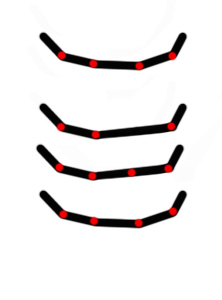
If we take this as an example, let's imagine we remove the 3rd dot. If we then add back a dot, its position would be changed and placed into a straight line, breaking the flow. With the command "edit edge flow" on that point, we would have the position back to normal. This would work both on an area or on a single point.
Is there anyone who know if there is already a tool or if is going to be developed ? I hope that from the next Blender version there will be a similar function, because this is really something essential for modellers.
Thanks !
14 Comments
Benjamin Sauder released an Edge Flow addon for Blender in September. github.com/BenjaminSauder/EdgeFlow
@paul.wanamaker: wow, i didnt see it
I have found some old discussions on this topic, and one guy was working on it but seems like never finished. This feature is really needed for any serious workflow and it make blender even stronger modeling tool
@conflig1: I see.. well I really hope someone will carry on his work...as it stand , it's very hard to deliver anything top quality without spending a lot of time on it.
I so...so agree with you! Relax and other loop tools are good for fixing some issues, but they have kind of a shotgun approach...they lack refinement. something like what you can see in the modo example video would be so nice!
@juantxogargallo: unfortunately it's the only thing that I miss from Maya, because it allows you to reach the perfection. when you are working with soft surface, or something that needs to be very polished, such as a car....you must have somthing to fix a surface. I find out a workaround, but it does not always work. If you delete the faces and do a grid fill, it will fill it following the flow.
Please, we need and edge flow tool!
Maya has Zen Tools which you can add on. It aligns all your existing vertices on a curve and lets you modify that curve afterwards. The loop tools curve mode tries to do this but the cubic curve messes the other vertices that you have not selected as well. Is it possible to get the tool to only adjust the points in between the vertices that you have selected. like zen tools: youtube.com/watch start watching at 3:50 min in
* @o0o8a8ieo0o * you can use mira tools or bezier mesh shaper
All this already exists, and a long time ago, it is better to concentrate on what is really needed. If you need to rewrite Loop tools maybe make it on numpy for faster work, it would be good. Example youtube.com/watch
Applying a modifier to a selection or vertex group could do this. I wish I could do this even with SDS modifiers. Softimage had this non-destructively.
Very Good Proposal . I recently struggled to get nice edge flows with my car modeling project , i tried every thing but nothing works that perfect . It doesn't mean you can't do it , you can do it by selecting vertex by vertex or edges and sliding moving the stuff around which takes a lot of time . Modo's Edge flow tool is looking awesome something we need like that in blender too . If this implemented in Blender it'll help to boost up workflow of modelers.
@jhn.b.jhn: it will never be precise working in this way and you would ended up with a surface that might look off under some kind of lighting situation, depending on the perspective :) . even a point could blow your model flow :'(
@jhn.b.jhn: try curve from loop tools