
"Open in Dopesheet" Button to Context Menu
ISSUE: When animating some properties like materials, world, custom properties, etc., it is difficult to find them in the dopesheet, as they are usually not attached to an object. Would it be possible to add a feature to "open the property in dopesheet"?
There already is a keyframe menu when you key a property, so it wouldnt be a huge UI change.
PROPOSAL:
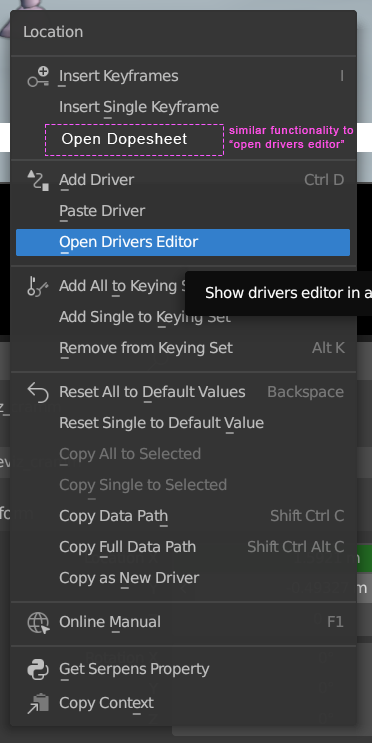
When keyframing a value, it would be great to right click it and have a menu option that says "open in dopesheet". That would reveal the current keyframed property in the active dopesheet or timeline.
8 Comments
It's not difficult to find, when you understand how it works. If your dopesheet shows only selected datablocks' keyframes, then select a node to see its keys. If you frequently animate shaders, then having a group node with all the animatable properties, or a bunch of custom properties on your object or rig makes it even more accessible.
How would this "show keyframe" operator work? Would it just pin the channel in the dopesheet?
I imagine it would just select it and view it in the Dope Sheet, it doesnt need to pin it or isolate it.
It is actually quite difficult when you do it often. It takes usually some messing with the filter options and typing. Especially character animators that need to deal with IK/FK switching have this issue. Animating materials has the same issue and I am pretty sure Geometry Nodes as well.
I might take on the challenge and write it as an addon myself :)
I'm not sure to get it, that sounds like more clicks than selecting the thing you are keying for the same final result.
It is the same principle as the shortcut to "Open Drivers Editor" in the "Add Driver" section. There is "Add Keyframe" section right above it, so it would make sense it would have "Reveal in Dopesheet" in the Keyframing section.
Oh I see now 😮
Maybe this could be added in the original post with a lil mockup to help visualize the thing.
Great suggestion, I did that :) Do you think it Is clearer now?
Definitely yes! Thanks for the edit.