
Hover Modifier Icon for Original Modifier Name
Can we get the original name of a modifier show up when hovering over the modifier's icon, instead of that repeated message saying "Set Active Modifier", please?
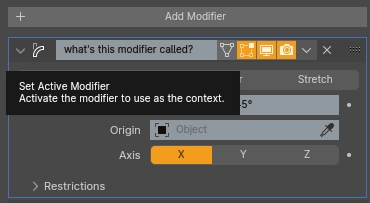
I, never click that icon to set a modifier's active state.
I either expand the modifier's window (which makes the modifier become active), or change a modifier's settings in an already expanded modifier window (which also makes the modifier become active).
When customizing the modifier's name, we lose the original name, and someone not familiar with the modifier's icon will have to delete their custom modifier name, see the original name, and then rename it again.
I think that icon hover would be a better fit to display the original modifier's name, and would be a QOL improvement for newbies that can't yet name the modifier just by its icon.
I think people will quickly understand that any click inside a modifier's window will make it active, so that icon's present hover info really loses its importance really quick, and would be used much more efficiently by displaying the original modifier's name!
CORRECTION: Expanding a modifier window doesn't set it to active, but perhaps is could? The same way draggin a modifier up or down the list does?
Any counter-arguments? Would love to hear them.
2 Comments
The tooltip coulc show this information plus the fact that it activates the modifier.
yes