
Timeline update
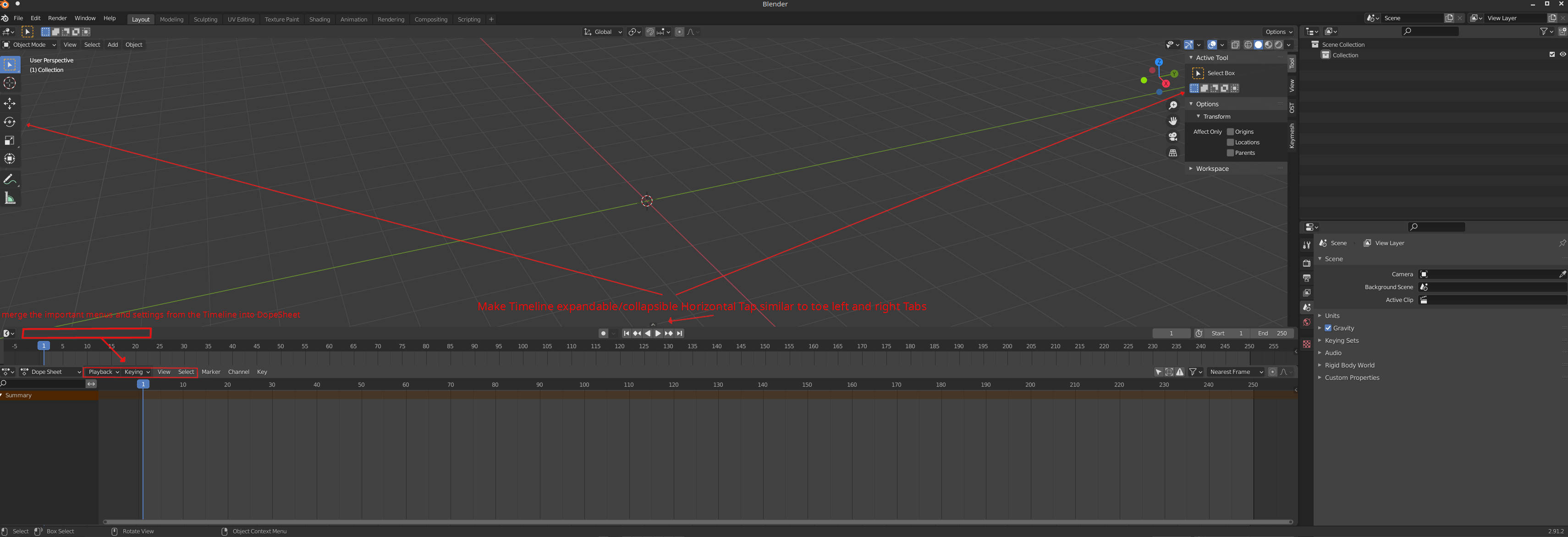
Hi all, I propose to change the timeline from an Editor window to a Horizontal expandable/collapsible tab similar to the ones in the left and right screen - toggled using T and N shortcuts. In this case, the Timeline can be seen at the bottom.
Motivation:
-
Most of the functionality of the Timeline overlaps with Dope Sheet thus 2 very similar editors always ON (when animating ofc) in order to only use few things from Timeline like - Autokey, playback controls, and preview range controls. So if the main options are moved to the Dope Sheet (Playback and Keying) Timeline can become Collapsible Horizontal tab.
-
Currently as editor Timeline is lost when pressing Ctrl + Space in order to Maximize the viewport and makes it harder to work with time especially animating in fullscreen. Would be good to see anim keys...
-
Many other viewport Editors will Also benefit to have a timeline, even if they don't provide animatable content, it's nice to be able to see how the scene animation is working for timing refs etc. (for example even when texture painting or sculpt - there is reason to have a timeline to maybe sync your task with other objects animation if needed).
P.S. I know there is another post but it only covers merging the Dope Sheet and Timeline.
0 Comments