
Inserting keys changes the shape of the curve - can it keep the curve the same shape?
Currently when inserting a key on a curve, it will change the shape of the animation curve. In order to fix the shape, the animator has to go in and tweak the handles.
When inserting a single key, that's not so bad.. but when inserting LOTS of keys, it can really slow down the workflow.
Instead, can we have the handles be adjusted automatically to maintain the shape of the curve?
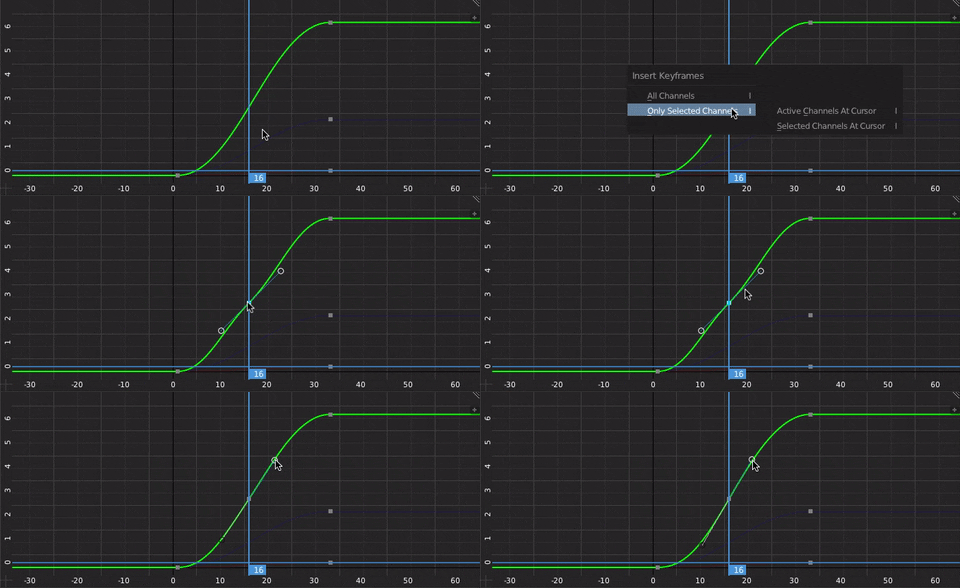 !
!
9 Comments
This would be great for regular curves in the 3D scene as well.
Would this be:
<ul> <li>A new default behavior?</li> <li>An option/toggle behavior when inserting keys?</li> <li>A selectable interpolation type?</li> </ul>
For what it's worth, I'm thinking new default behavior might be the way to go.
Yep, I agree.. new default behavior should be like this. :)
Absolutely should be the default behavior. If you want to mess with the curve, you can do so. But getting it back to exactly the form it was in before adding that key can be a serious pain.
yes please!
my comment can be very ridiculous and made from the ignorance, but, if you want to keep the same curve, why to add a key? which is the usefulness of it?
Commonly you want to edit part of a curve (before or after the new control point), but want to leave the other side of the new control point untouched.
it would also when creating a key on every curve not mess with the curves you already have, since you can't block easily the creation of keys on some attributes.