
Asset Browser: "Essentials" catalogs to be placed inside an "Essentials" catalog
I feel the Asset Browser is a bit messy with all these catalogs coming from the Essentials. It would probably be neater to place all Essentials catalog inside a master "Essentials" catalog.
| Before | After |
|---|---|
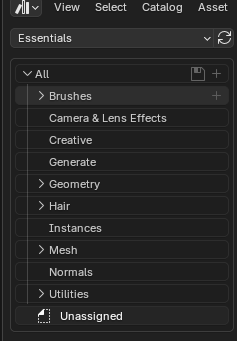 with
with
|
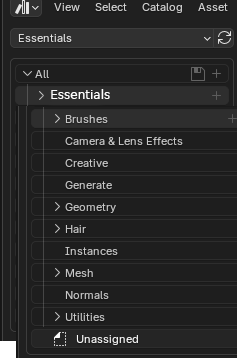
|
2 Comments
But that quite defeats the purpose of being able to see the identical asset catalogs merged as one.
E.g. I definitely would not want to have Brushes split into different catalogs when I already asked to see all libraries hoping all Brushes would be in the same place.
Maybe a better GUI would be to select the currently displayed libraries using checkboxes instead of having a drop down menu where we can either see one or all libraries.
Similar to what we have in the asset library preferences:
Or in the asset shelf:
I also have found this to be an issue. At this point there are many "Essentials" assets and catalogs, and there is no way to change the catalog of the built in assets.
In my current workflow, I have multiple asset libraries for files from different sources and for different purposes. I categorize them into the same catalogs, so everything is organized and easy to find. Currently you can either view all libraries or a single library, so if I want to browse all of my assets I have to also browse the "Essentials" assets.
I have 4 base catalogs, but they get completely lost by the 10 essentials catalogs, some of which have very similar names to my own catalogs. Every time I want to browse a specific catalog of asset in my own libraries, it takes me a little bit longer than it used to. The documentation for the Asset Browser currently says "it's all up to you" on how to catalog assets, but currently that is not true.
The other thing to note is that it is also a problem elsewhere, like in the geometry nodes editor's "Add" menu
I can think of two solutions.
The suggested multiselect / checkbox select for the asset libraries that you are viewing. I do like this solution, though it is still a problem when you do want to see the built in assets too, and doesn't solve the issue with the geometry nodes editor.
Allow users to assign catalogs to the built in assets themselves. This way they could put them all into a parent "Essentials" catalog if they desired, or instead integrate them into their own catalogs. This would give the most control, and fully fix the issue. This could potentially be part of some sort of catalog override system, or implemented in a more direct way. Additionally a small icon or tag could be added to the built in asset icons to be able to distinguish what is built in.
I prefer solution 2 to solve this particular issue, though I think solution 1 is also very needed in general.