
Overlay for Mesh Triangles
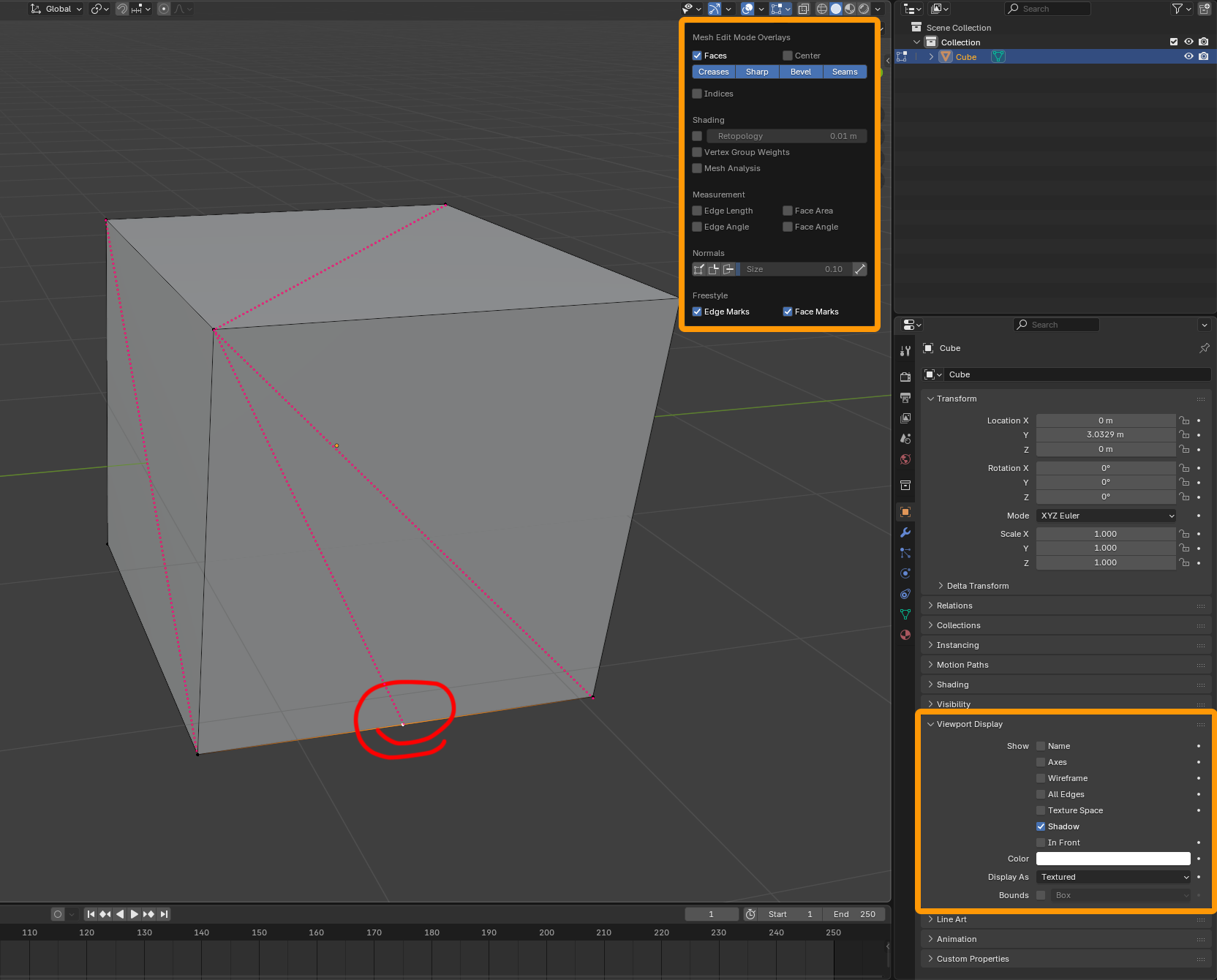
Blender should have a mesh overlay for visualizing the "invisible" triangle edges that make up quads and n-gons. This is a common feature in DCC software that is useful for mesh inspection, debugging, and topology clean up. For example in the attached image the bottom edge of the cube has an errant vertex that stands out immediately due to the extra triangle edge. The typical convention for showing these invisible edges is to render them as dashed or dotted lines to distinguish them from "real" edges.
Another example where this is helpful is when the user needs to manually control mesh triangulation for export (especially on curved surfaces where the quad's triangle ends up being concave by default but needs to be convex). This assistive overlay would let users see at a glance where they need to make new edge cuts with real edges to correct the direction of the hidden edges.
There are two possible places where the checkbox for this overlay could go; in the Overlays dropdown in the corner of the viewport as a global toggle like for displaying mesh normals or face orientation, or it could go in the Viewport Display section of the right side panel on a per-object basis. I'm not sure where the best location would be. There are good arguments for both locations so maybe "both" is the correct answer? Sometimes you may want this automatically shown for every mesh you take into edit mode, and other times you may only want it on for one specific object.
0 Comments