
Increase Animation Timeline Precision
Why do we need a more precise timeline?
Scaling keyframes will move keyframes unevenly & even merge keyframes which deletes your work.
Solution
Timeline supports placing keyframes on decimal frames.
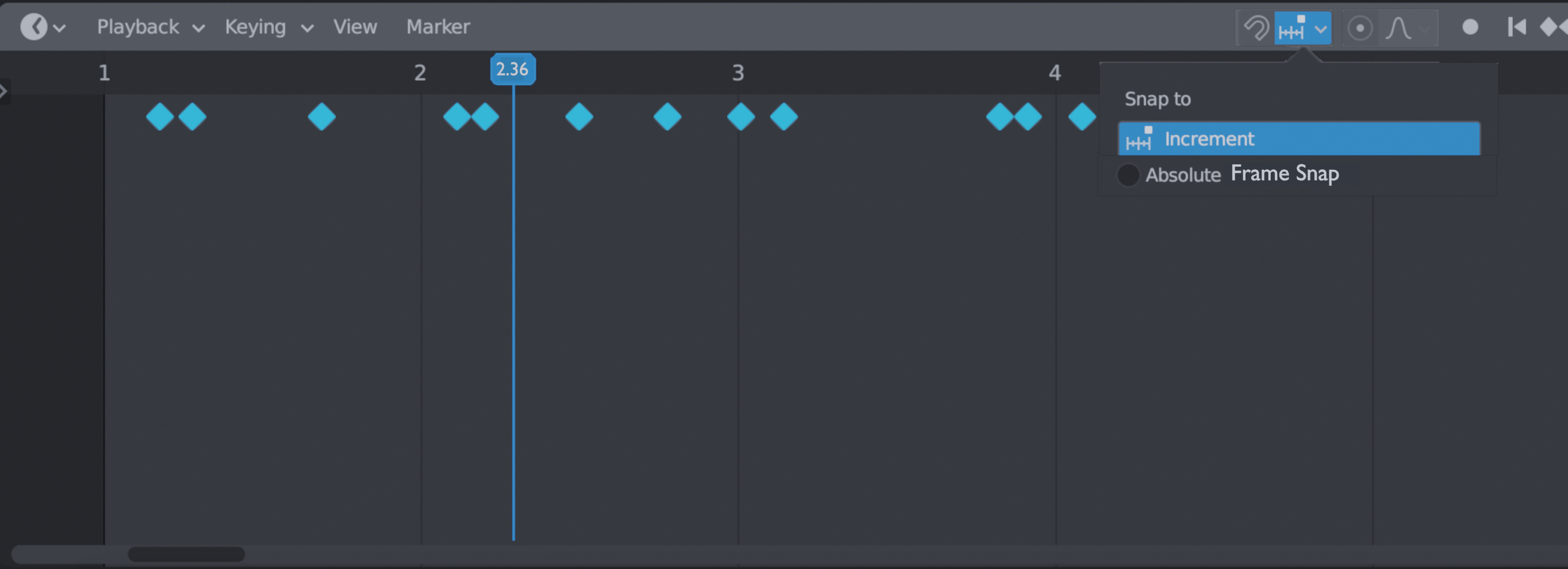
Snapping menu with "absolute frame snap" to use the timeline like normal.
Unrelated, but proportional editing for keyframes would be cool too.
2 Comments
There should be options somewhere - either in the graph/dope sheet or in Blender's preferences - to enable keyframes to be snapped on frames and on values increments.
* @-L0Lock- * The "absolute frame snap" option I added would be the equivalent of Blender's absolute grid snap (3D view) where it snaps keyframes to the nearest frame when you move keyframes, instead of geometry to the nearest grid points. For making things more intuitive, it could be called absolute grid snap, but I thought the timeline isn't really a grid because it only has x-axis increments. So I decided on calling it absolute frame snap because it'd snap keyframes onto frames.
The menu I added also has increments, but doesn't have any option to change the increment amount. It'd be cool to have a box where you can type in the increment distance. For example, 0.25 frame increments, 10 frame increments, etc.