
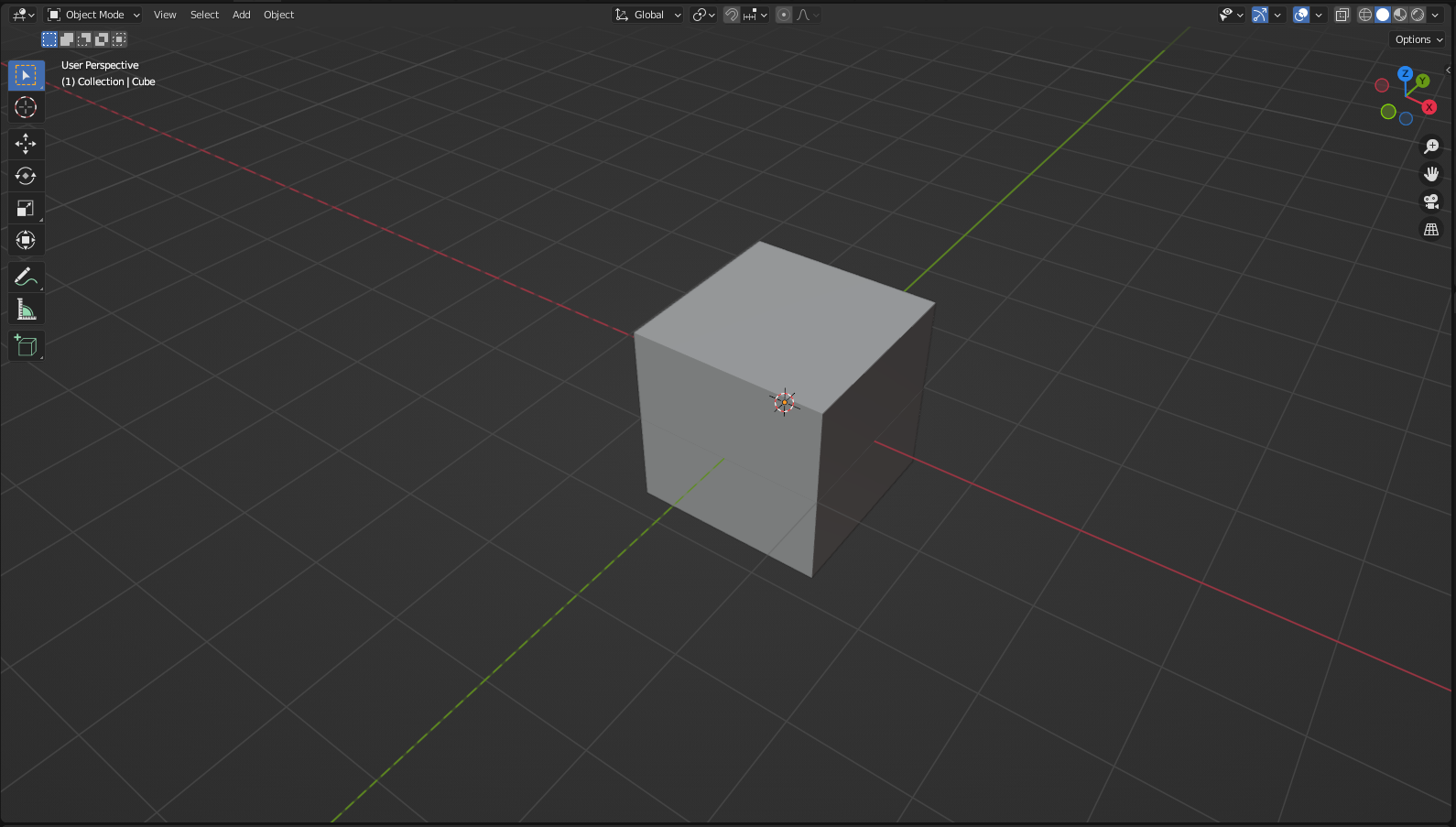
Viewport - Dashed Lines for the Negative Axis Lines
Currently transforming objects using dimensions in blender is a bit of guessing in which direction the object is about to move... but the thing blender does best in this situation is it allows an input of Minus sign after the number... even multiple minus signs... that is the best....
But that being said it would be nice to have an indication of the Negative Direction in the 3D Viewport (Other Than the Gizmo).... my proposal is not a new idea..... in CAD softwares Negative Axis Lines are shown with Very Thin Lines or Dashed Lines or a combination of both, and i thought this idea might be useful to adopt in blender.
Edits: Clarification and Spacing
4 Comments
Great idea. I'd do the same dashed line treatment on the viewport gizmo in the corner too.
I'd take it a step further:
Any time you press 'g' and then 'x', 'y', or 'z', I'd have the line that appears have the negative side dotted no matter where your item is located. That way, if the camera and object are nowhere near the origin, you'll see which way is positive/negative.
It would be great to add the ability to change the dotted line in the user preferences.
This is pretty nice and seems like a relatively simple thing to implement
I think sometimes if I'm rotating a bone, I'm thinking... which way will it rotate if I type in a positive number? If I type a negative number?