
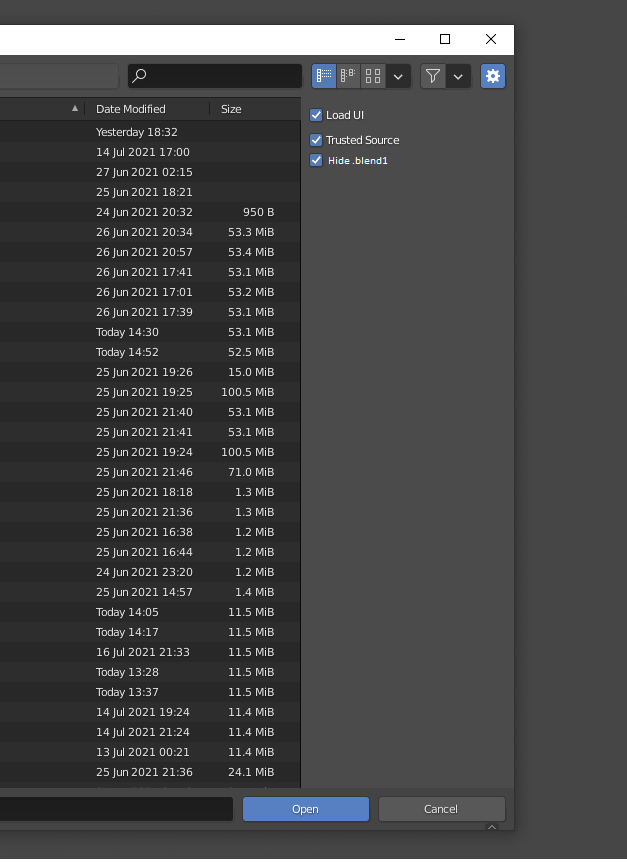
Icon for .blend1 and fiter for extensions in file manager
- Right now the Icon for .blend1 and .blend is the same. This made situation that easy to do mistake for open not correct saved files or other in iteration process of saving.
Need second icon, eg. black/white color
- On file manager icon is different as black and white, but is still possible to do mistake in file selection.
Need filter in file manager for show/hide .blend and .blend1 files - good to have this same convention like in point #1 to not doing color dissonance
- Alternative way is add additional columns with extension for file, then turn off unneeded extensions (eg. dfx, .dae, etc) or dirs (if many - have problem with this too if many assets, etc. and can be helpful in work with external files) - the checkbox "Show only .blend" also can be nice.
Add column wit extensions for filtering
3 Comments
IMHO the idea to make incremented saves in the file extension is a big mistake in the first place. It's a big mess to manage, because OS manage each extension individually. So for each .blendx you have to make entries in the registry, set a default program, set a call for managing thumbnail, set a default icon, ... And each user can set up to 32 of them!
The same feature could have been achieved by just changing the file name like everywhere else, and that would save the trouble of managing up to 31 new file extensions.
Because in blender they are already black/white and in OS level i supose you have to change it yourself know eg.
like that
if You are using windows:
and in OS level i supose you have to change it yourself know eg.
like that
if You are using windows:

The suggestion is to register in OS by blender the black and white icon for blend1 and in Blender the .blend as normal coloured. Why do this by manual per user not like normal standard?
Well.. again.. blind eyes :D
Also thinking about to add to filter the discovered extensions like listed eg. dxg .skp not the constant on the GUI as now.