
[2.8] Workspaces and Proxy/Link
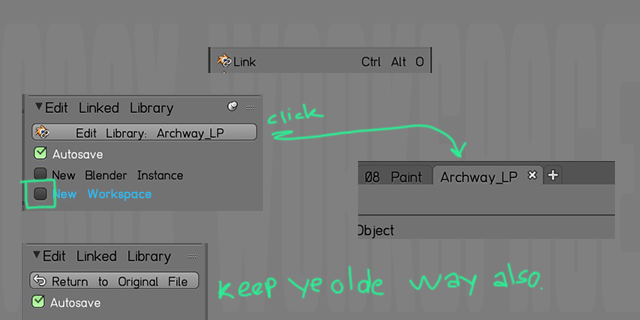
With our new awesome Workspaces in 2.8, I suggest a option to open an linked asset/proxy not in the current Blender Instance, or a new Blender Instance.
But! also in a new Workspace.
So we can keep it as it currently is, but with an checkbox option, you can make it so editing a Library Asset/Proxy open up the linked asset in a new Workspace that has it's name.
Imagine how neat it will be working with a Scene and you can have an asset in a Workspace and just do some small adjustment and see it update instantly. Without the need to click Edit Library (Open .blend file) do the changes, Return to Original file. Realize you need to work more on the asset, jump back and forth.
Just have a Workspace tab with the asset itself and work on it there, then click the Workspace you can see the asset Proxy in the scene. Boom! quick and great.
The old way of opening up a new Blender Instance is a bit more immersive when you have a complex asset that might itself require several workspaces to be worked on. But for smaller things and quick scene setup this might be a really awesome way to start a scene with lots of Proxy assets.
I can't really think of any drawbacks. Just lots of improvements for my workflow if this was possible.
4 Comments
Sounds like a GREAT IDEA!
@Luciano Muñoz: though given that edit linked library is an addon, it might be to the addon developer to do this
True, as soon as Proxy starts to work in 2.8 for me I will check it out. Current build it's not working. But just now Blender Developers uploaded a video with Brecht talking about the Collection code post. So hopefully linking in Collections will start to work in nightly builds.
Good idea, keep one instance of Blender for different blend files and linked data.