
Rotation Snapping for Camera and Objects updated.
Hey guys, I posted this devtalk.blender.org/t/rotation-snapping/713 on Blender Dev Talk but wasn't sure if that was the right place, so am trying it here.
I have always been surprised that Blender's Rotation snapping for both objects and camera in the viewport is pretty confusing. Let me know if you guys have any thoughts.
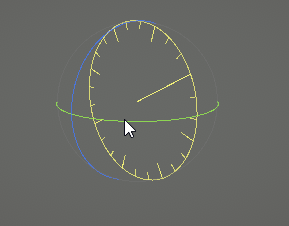
It is hard to know what increments is set as the native for rotation when in incremental snapping, so I think it would be extremely helpful if the manipulator widget both visually showed the increments and also used larger increments (possibly of 45 degrees). Also for those of us that love hotkeys, it would be extremely helpful if the objects locked to the closest 90 degrees when holding alt, the same way the viewport navigation works.
Here is a list why I think it would be very welcoming to new users rather than our current numpad system.
1.) Figuring out the math is not friendly to the artist and remembering the often used 45, 90, 180, is not friendly to beginners, not to mention the negative equivalents, -45, -90, -180.
2.) It takes longer to look down at the keyboard (especially unlit keyboards at night) and the numbers are too far away to rely on muscle memory.
3.) Countless more complications (pun not intended :yum:) when keyboards are designed differently, not to mention both the new modes and many add-ons like to map to those numbers.
4.) When rotating something symmetrical in 90 degrees, there is no visual indication if it even rotated not the less left or right.
So the solution I would purpose is to map alt to snap objects to the closest 90 degrees in the same way the viewport works, as well as increments marked on the 3D widget.
I also would like to purpose an input preference added right next to the to Left Click Select option that allows users to switch Shift and Alts functions since shift's function in most other software is set locks rotation, both for objects and navigation.
Thanks so much for reading.
9 Comments
As mentioned, snapping does exist in Blender. It would be helpful if you included the actual text and images from your linked forum post to here. Otherwise, this doesn't read much like an actual proposal.
@Jason van Gumster: Good idea, thanks. Also, I just found out after many years of use that the viewport camera does snap when holding alt!!!!! I wish that method transfered over to rotating objects.
Does anyone know why it is set as alt instead of the shift, it seems shift standard function in most programs is to locks angles. Maybe it's common in Linux or similar to the right click logic? It's silly but after watching thousands of tutorials and I don't recall anyone mentioning it, Blender Sensei even recreated that function in an addon so I guess he also didn't know. Maybe for those that choose left click select, it could also swap alt a shift's functions which would be more consistent with other software standards?
@wondraknathan: <kbd>Alt</kbd> is a bit of a weird choice... especially since <kbd>Ctrl</kbd> is primarily used for object/feature snapping. And it's not really a Linux thing... a lot of Linux window managers actually override and use <kbd>Alt</kbd> for their own purposes. Most Linux-based Blender users end up remapping the hotkeys in their window managers.
I personally wasn't aware that there were standard hotkeys for viewport snapping (I so rarely use that feature, opting instead to use the Numpad keys or the <kbd>Q</kbd> hotkey with the Pie Menus add-on). Would it be possible for you to compile a list of which applications use what hotkey for viewport snapping?
@Jason van Gumster: Thanks, that is very insightful, I never used Linux but am considering it down the road. It is very strange how this function evaded many forms I read as well. In 2.79 it seems to exclude snapping only to the front ortho view, so maybe that is why no one realized it. Eather way I think this feature is incredibly fast and purposeful and could really use some exposure. I can only imagine how much the new grease pencil animators would love this. Sure, though this list is only based off my experience which is pretty limited. Software that uses Shift to snap view.
Zbrush
Substance Painter
Photoshop (if the Rotate View Tool counts, but I imagine its a common theme in Adobe)
Unity snaps object this way but not the viewport (Unity is growing in use of hotkeys but still seems to be a work in progress)
Maya and Autodesk do something similar but with a different twist. Shift for them constrains the rotation to a single axis the same way Blender's object rotation can be restrained with the middle mouse. I wouldn't mind this method eather as long as it is consistent and objects start using shift instead of middle mouse.
Personally I find many of Maya's methods to feel outdated and Zbrush and Substance to have a stronger sence of making things feel natural, but who am I to say, Autodesk is catering to a more generalistic demographic.
Rotation snapping does exist, but I agree it could be a bit more flexible. And it's not easy to find because the terminology may not be what you expect. It's done with the Snap tool (I'll assume you know where that is or can find it).
Change the Snap option to Increment, then either hold down the control key while rotating or activate the Snap magnet. You'll get rotation snapping to five-degree increments.
But I admit, it would be nice if this could be changed from 5 degrees to whatever increment you want and I don't think that's possible. If it is, no one's talking about it on Internet-land. So, I'm going to vote you up on this.
@rontarrant: In addition, you can simply type the angle number and hit enter. Maybe it would be useful for someone to always have some other value as default but I never found it to be a problem. As I said that might be a problem for some specific and repetitive use. You can also use the repeat function when you set an angle and exit the rotation and then just do Shift-R. Not sure if that is the default shortcut but its what I use.
@luisburdallo: Thanks for the response, unfortunately I don't have a num pad on this computer and with modes being mapped to the other numbers in 2.8, the emulate numbers will no longer work. When rotating, I know the shift key is precision, so what if alt snapped to the closest 90 degrees the same way viewport navigation does? I imagine that would be very handy especially when combined with the middle mouse axes restraint. Thanks again.
@rontarrant: Hello, Thanks for the response, voting this up and for letting me know that it snaps to 5 degrees. I will use it more often though I also agree that being able to snap it to larger increments would be very handy.
* @wondraknathan * well, with the majority of Blender being .py scripts anyway, is there a way that the 5 degree increment can be say HARDCODED (like to abandon the 5 degree snapping permanently to something like 15 degrees?)
I don't know because I wouldn't be able to wrap my head around how to do that at all, but if most of the functions are scripts, there SHOULD be something in that slew of different scripts that when grid snapping occurs, it makes ticks at 15 instead of 5 or so.