
Add Objects Tool
This Tool is similar to my other proposed Tool Scatter Objects that it shares a Tool category with (like Scale and Scale Cage) so some functionalities are the same.
This is a Proposal for a new Tool in the Toolbar:
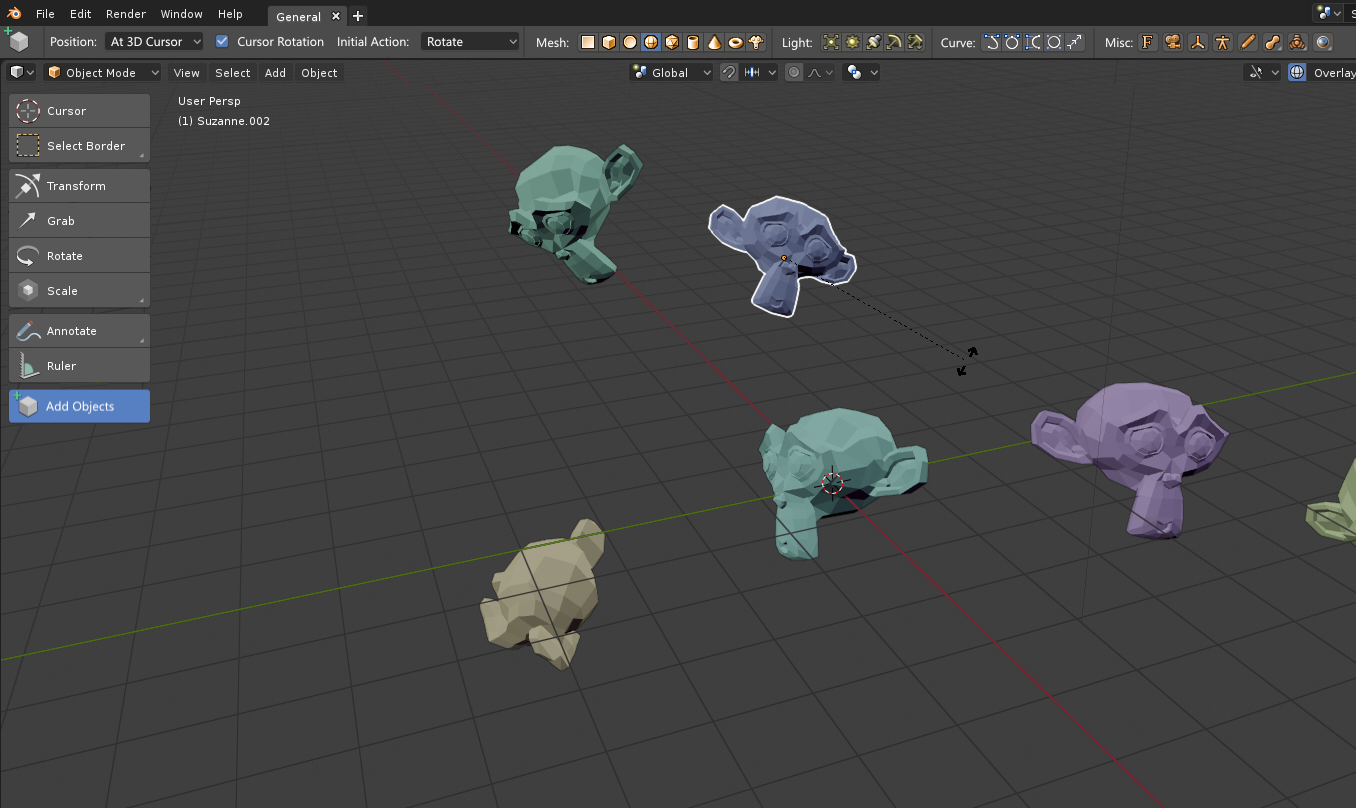
Add Objects
. It's purpose is to quickly add and arrange multiple Objects in the Scene. The User can select an Objecttype in the Topbar and can then add Objects of the selected Type to the scene with clicking. Clicking once creates the object at the configured (options below)
Position
in the Scene. The user can then perform an
initial Action
(based on the Options Below) for example Scale the Object with dragging the Mouse. Another Click or Enter confirms the initial Action and the User can add the next Object. Rightclick or
ESC
cancels the initial Action (just like regular transform operations).
Topbar Items:
Options:
Position:
- At 3D Cursor (could display have an option- Use Cursor Rotation )
- At Mouse Cursor
- At Selected Object
- At World Center
- Surface (at Mesh Surface under Mouse Cursor) - could display an option - Surface Rotation to rotate the Object according to the Surface Normal)
Initial Action:
- Translate
- Rotate
- Scale
- [Rename]
Object Categories:
The most used Objects (Meshes, Lights...) should all be displayed individually while less used Object Types like Meta-Balls and Surfaces could have a dropdown containing all the Objects (The same way Subitems work in the Toolbar). See attached Screenshot. Depending on available horizontal space, Mesh, Light and Curve categories could be collapsed to a single Icon too.
This Tool could also be available in Sculpt and Edit Mode - And of course hide everything except the Mesh category in this modes.
0 Comments