
Predefined bone shapes
We have several ways to display an armature - Octahedral, Stick, etc. - which are great for limb-like bones. But for control bones, we often want something not oblong, like a cube or a circle.
The solution is to define a custom bone and, for every scene where it is reused, link it in or remake it, then hide it, so it is invisible in the viewport. While the custom feature is powerful, it takes up space in the outliner and requires a few extra steps of work to explicitly define, organize, and append or link shapes for every scene with control bones. This is fine & dandy for elaborate custom shapes; but what about when the intended shape is a primitive already well known to Blender by default?
Right now the user is encouraged to either (A) use no Custom Shapes, or (B) make extensively modified ones. If you want to rig e.g. a few scenes with pairs of eyes, where the target of each eye pair uses a sphere instead of a floating octahedron, the current process of producing, organizing, and assigning a custom bone object for each one feels almost wasted on the end result. You won't benefit from the flexibility of having a custom shape if you know no extension or elaboration on the primitive will be necessary, but you still have to go through the motions of producing a unique handle shape.
The difficulty of gauging the popularity of an approach of using an unmodified primitive as the custom object to a control bone is that the UI discourages it; your only option is to produce a bespoke object for each type of custom bone. But the existence of add-ons like Bone Widget (2k+ downloads) indicate that a library of common bone shapes would not be unwelcome. My suggestion is to allow the user to skip defining custom bones entirely.
We could get a nice shortcut boosting rigging speed, versatility and accessibility by offering a set of default bone shapes available for individual bones, so that creating e.g. a cubical control bone is as simple as selecting "cube" from a dropdown list in the bone's properties. A large library (like Bone Widget's) is not needed or even recommended; instead a limited set of primitives: Cube, Tetrahedron, Sphere, Circle, could represent a lot of help, both for advanced rapid workers and beginners. The custom bone option would still be just as accessible and unaffected.
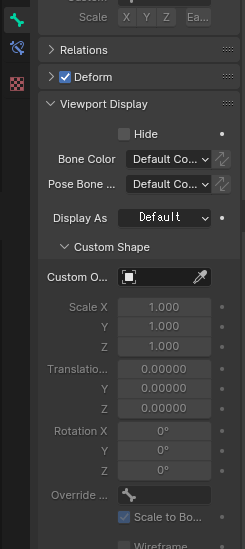
Here's an example of how it might look. We add a dropdown box "Display As" and it could have options like "Default" (use the armature's default octahedral/stick/wire/whatever), then our hardcoded bone library like "Cube", "Circle", (...etc.).
"Custom Object" would override the current "Display As" option; if this is not clear enough, we could have "Custom" as a separate entry in the dropdown.
1 Comment
See github.com/waylow/boneWidget