
Multi-layer Composite Output
When rendering without the compositor, Blender is able to save multi-layer EXRs using the scene's render settings. With the compositor active, that functionality is lost and only one layer can be saved. A common work-around is to use a File Output node, but that creates an unwanted extra output and needlessly duplicates the path and format settings.
Muting the main render is complicated because the sequencer and image viewer need to load the compositor's output. This PR has been stuck for years, and This one provides more info. It also doens't solve the settings duplication.
In my opinion, the File Output node should only be used for creating additional outputs, not replacing the main one.
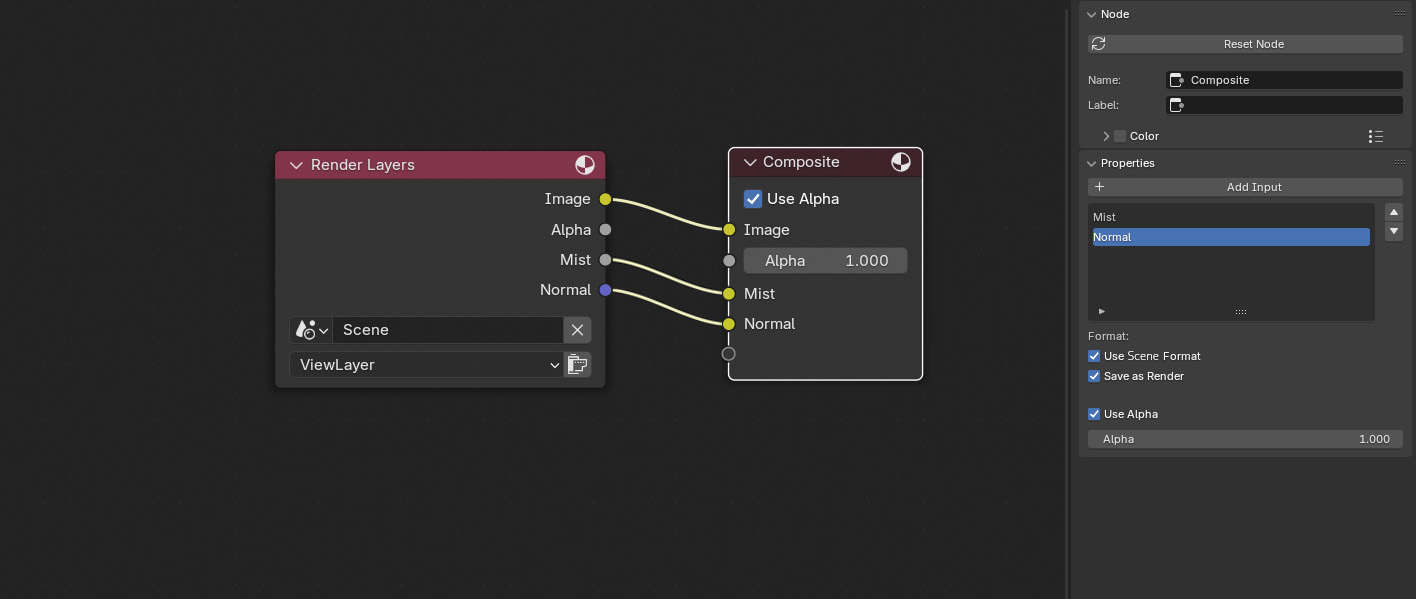
An alternative solution is to port some functionality from the File Output to the Composite node:
- Layers can be piped to the composite node by dragging GN-style
- Layer outputs can also be added manually from the options panel
- The options panel does not offer a path setting
- The data and compression type can still be set per layer
3 Comments
I also want the ability to not render the composite image when using a file output node. Most of the time I don't want the composite image as I will recombine myself in another software. Obviously, the composite has to be rendered but what I mean is I don't want to save it. Instead, I only want the passes that I connected to the file output to be saved.
This has been explored before as a solution but faced some difficulties because the compositor is not always the end of the render pipeline: projects.blender.org/blender/blender/pulls/117129
I made this proposal as an alternative solution to this problem. If you think about it, the only reason you are currently trying to use the file output node is because you can't save multiple layers with the composite node.
I would be happy to have a quick.. turn off compositor, let the aov's go directly to multi-layer exr. Without needing to manually hook it up.