
Minimal nodes UI setting
Moving forward for the nodification of everything, I think it could be time to look over the UI for the nodes. Especially entering values.
I am not super keen on the idea to have inputs that scales a lot depending on your zoom level of the node tree. Large trees you kinda zoom out a lot to navigate, then you have to zoom in just to change a value.
Unless you use the Properties panel which I found myself doing lot more lately.
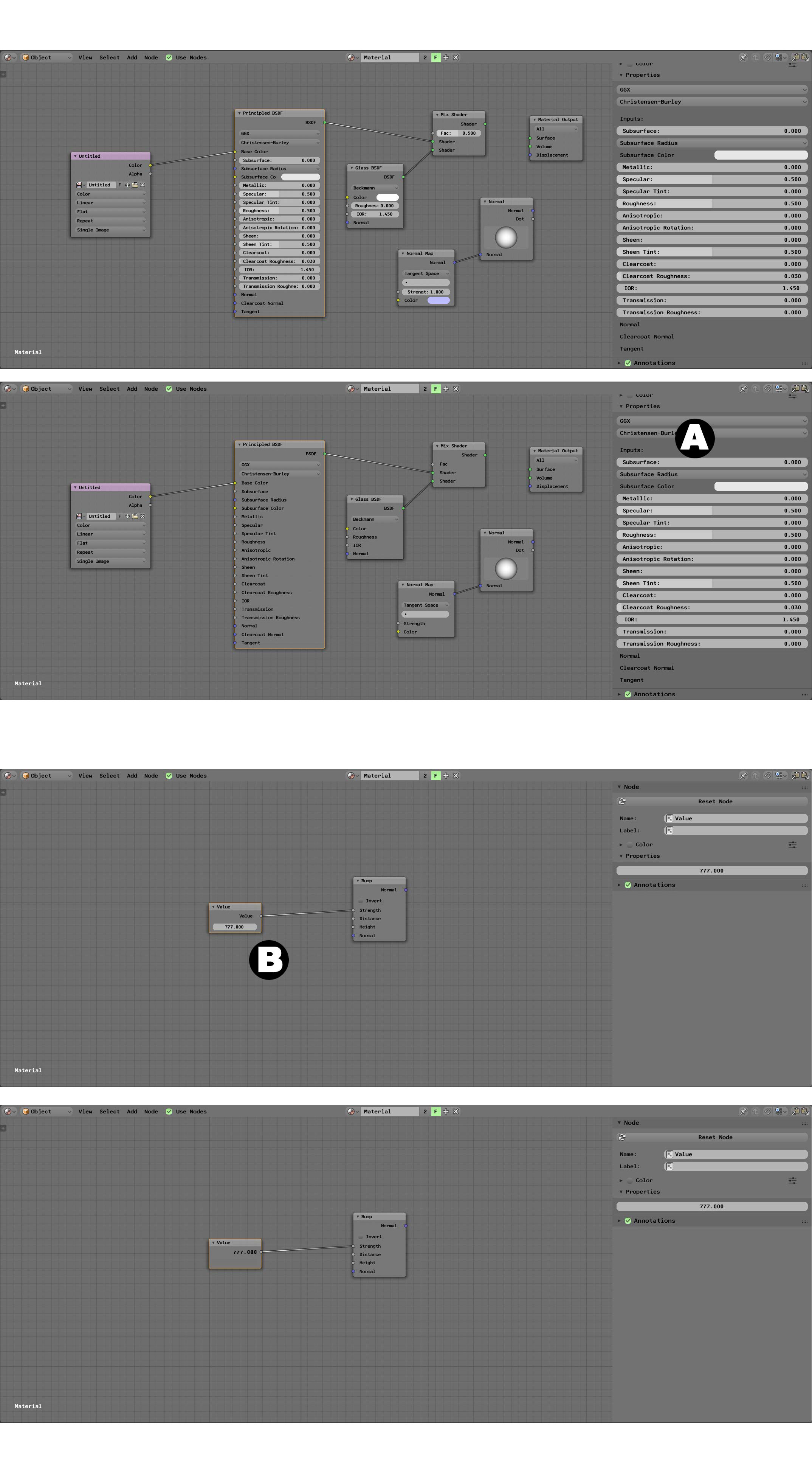
With a small user setting to use "Minimal Nodes" we could strip the inputs away from the nodes them self and just have them represent ... a node.
(A) The properties panel where you tweak settings and values. The input here are a fixed size and doesn't scale like when you use the inputs in the nodes.
Nodes should have no input fields when "Minimal nodes" is enabled. With no input fields it's also easier to move the node.
(B) Example of Value node, the value itself is set in the properties panel. The node should avoid duplications such as a label of "Value" with a "Value" output socket then the value field.
Instead the output value could be as label for the output socket.
Bonus would be to have drop down menus with only two options, like the Image Texture "Color Space" menu.
Instead of "Color" and "Non-Color Data" why not use Blenders radio button interface, with two options "Color" & "Data".
So when adding a texture that uses Non-Color Data, like a normal map, instead of clicking once on the menu, then once again on "Non-Color Data" you just click once on the radio button "Data".
The "Minimal Nodes" could be under "User Settings" --- "Node Editor"
2 Comments
Good Idea, but in your mockups I don't really see the advantage this setting would offer. You gain hardly any Space and the values are editable from the Properties panel anyways.
Maybe it'd be more useful if it was more consequent and also hide Enums, Checkboxes etc. and reduce the gap between sockets to make the Nodes even more compact.
Also Imo a checkbox in the Nodeeditor itself would be more useful than a setting in the User Preferences.
@Simon Storl-Schulke: I thought about a check box in the node editor. But I was thinking that was per editor, and it would become tedious always checking minimal nodes checkbox. Yeah the idea was no drop down menus etc. no UI in the nodes, only input and output sockets.