← All ideas9 May 2019panicq06OpenRiggingpanicq061CODCobraJakob.KloothJiPeLonkeMeshVoidOrphydianOskarPascalSPYReoxScaredyfishSlozhnyVyachWeekendZelforandreasus97bnzsdrawingistmusashiferranmartinezclargrialexeyjerzy.gorski.artmax.pulieromike2mipetr127nanomanprono4meomar.alwashmyonfilmpipelinerproceoreanimateromanvolgushev4565srikanth0126wvolbersxan2622
These are some nice suggestions. I think you should add them as bullet points in your post.
6
L
Lonke
I will bullet point these for easy reading
Improving weight painting for 2.8 suggestions by panicq06
When in solid mode using studio lightning for example, it's harder to see the mesh wireframe in 2.8 as opposed to 2.7
No add/subtract tool in the default weight-painting toolbar, it instead hides in the toolbar making it 2 clicks if you're using the draw tool or 3 if using another tool - this is a problem because those tools are used the most. You also can't add a shortcut to them.
Weightpainting undo is slow (possible bug)
White and dashed wireframe was easier to see than the one we have now (orange solid)
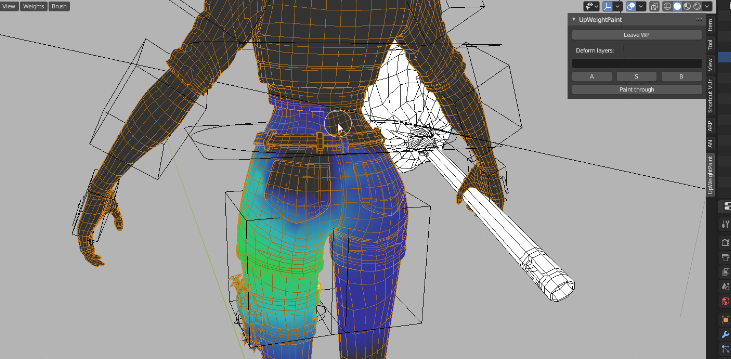
No easy way to enter a "weight painting mode" where the visuals are optimized for weight painting (he created an addon for this to show how it would work: Before hitting "Enter WP" it looks like the first picture below and while in weight painting mode the second picture)
Exiting WP mode would also remember the selections that were active when entering - this allows for fast adjustments when going between weight painting and posing

4 Comments
These are some nice suggestions. I think you should add them as bullet points in your post.
I will bullet point these for easy reading
Improving weight painting for 2.8 suggestions by panicq06
NORMAL MODE: Image WEIGHT PAINTING MODE: Image
His ideas, not mine
* @Lonke * Thx :)
very good hints.} here in my company people still using 2.7 to weight paint.