
Make Sidebar behave as Toolbar (1 to 2-column to horiz. text column)
The Sidebar isn't that user-friendly when too many tabs exceed the window's height. The tabs' vertical text isn't ideal either.
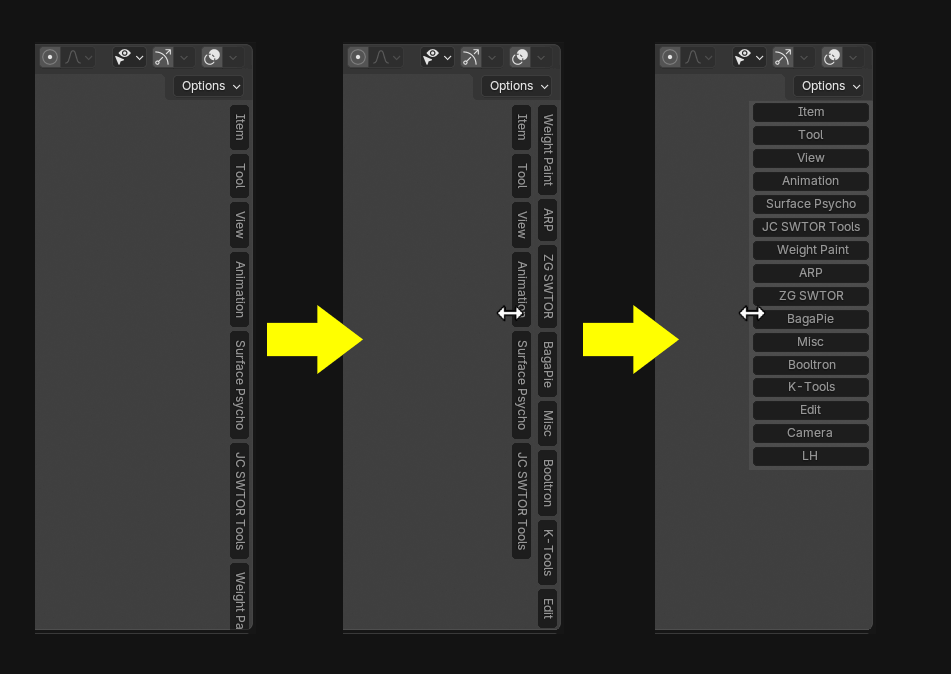
Having it match the Toolbar's behavior when being drag-widened would be ideal: add a second vertical column with a first drag step, maybe up to a third column via a second drag step if there are enough tabs for that, and then a further drag step produces a column of horizontal tabs.
I know that final step consumes a lot of screen's horizontal real state, but we live in a world where ultrawide displays are becoming actually cheap
(I guess having the horizontal text column next to the actual tabs' panels could be the actual showstopper for that final mode. It could look rather terrible if not done well)
5 Comments
The problem isn’t just the sidebar’s fault. The problem is also developers who make their own bespoke tabs, and users who install countless addons they don’t need to access 24/7.
I agree that something has to be done to make the sidebar more scalable. But also, it seems like part of the problem is that add-on developers prefer to jam features into the sidebar instead of integrating into the menu system, properties panels, etc. I'm not sure why... is it ease of development? Making sure your add-on is visible and discoverable once installed? Ideally the Blender team would get to the bottom of that. For instance, maybe Blender needs an "Add-ons" menu where certain add-ons would live. Or some other sort of panel that's more extensible than the sidebar's sideways tab UI.
Some big add-ons with many thematically related tools or workflow steps, such as an Auto-Rig Pro, would suffer if their options would be scattered all over Blender's menus and palettes. I develop such an add-on, actually 😅.
I have this problem as well, I made several addons, and with the time I kind of regret not making a special tab called "my addons" to gather everything in the same tab.... I have a lot, it is not ideal.
Now, maybe we (=the community) can set some kind of classification, for addon makers to put their stuff in the right category. the edit tab is pretty good catch all, but in the same fashion we could think about "rigging", "automate" (for scripts like the wonderful "dynamic parenting" addon), "color", "assets" (for link to external resources like poliigon, sketchfab blenderkit....), "generate" (for everything procedural like fragmentation, bolt and screws makers etc...)... we can probably come up with a list of the 7 or 8 more used category and that would include over 90% of all addons.
now, will the addon makers use those category system? nothing is less certain.... ^^' but probably worth the shot in the long run.
I'm a heavy user of add-ons, but I do not maintain them on at all times, I filter them out in the Workspace panel and keep only what I'll use for the Scene I'm working on.