
Massive Batch Transfer/Update/Substitute/Replace/Append/Link of Material Asset directly through Outliner
Hey, folks.
I think we are missing an accurate, in-built Batching feature, that would allow us to Transfer a Material in a more direct, spontaneous way, so that it can substitute, at once (Batching), whichever Material that is sharing the same User all over the Scene in whichever amount of Mesh Objects.
In the screenshot below, you can see that the Material in the Scene, named "MATa@-WireframeFix-01", has got 10 Users.
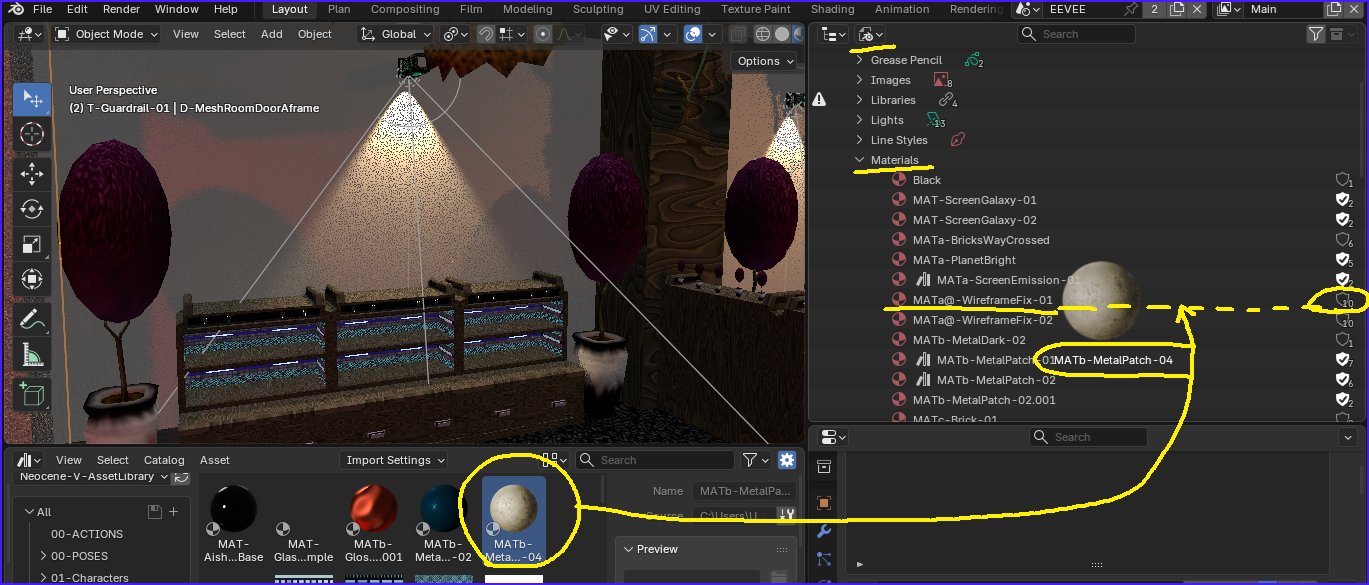
I don't think we want to be 'chasing' Mesh Objects all over the Scene, and then replacing those Materials into them one by one.
Laloque indicated (in the Comments section) there already exist a Material Batching solution; it's called the "Remap Users" Operator (from RMB-Clicking a Material in the Outliner: Blend File), and it works! that Operator does the accurate Material Batching, however, note that in a 'reverse' way. My proposition is still valid, because it would be other way around (a 'direct' way), so it would help make Blender more user-friendly, powerful, and perhaps even more consistent within its own versatile logic.
Also, note that, currently, the "Link Materials" Operator is underdevelopped: there is not an Adjust Last Operation Region for it even. Hence, we cannot rely on it for the more advanced cases (e.g., whenever the Destination Mesh Object(s) possess multiple Materials [instead of just 1 or none], or have got their own, different Materials list); that Operator will just disrupt the entire Mesh Objects' Materials Setups, because although it recognizes exactly the Source Material we want to Trasnfer, it doesn't have means to know HOW that Trasnfer needs to correctly; it doesn't understand 'Individuation' when it comes to Materials and Materials slots and their listing; it's more like a Copy-Paste of the whole Materials Mesh Data between Mesh Objects: 'Material-List' to 'Material-List'. It's not useful in intermediate to advanced cases.
However, by just making it possible to do a simple Drag-and-Drop solution in the Outliner, we could easily solve that issue (in a 'direct' way), because the Materials in the Scene in the Outliner are organized in a different logic, which is much better for this kind of Batching methods (no wonder the "Remap Users" Operator is also found there in the Outliner).
Thanks!
PS: Sure, improving the Link Material Operator or making new ones, is welcomed too, even fundamental? But my proposition here is about this other alternative. I was a bit shocked it wasn't possible in Blender to do that trick in the Outliner!
2 Comments
I might be wrong, but I think the "Remap Users" operator you get from the Outliner in Blend-File mode does this?
But it definitely could use some modern touch... This wouldn't fly with a large scene:
If we could drag and drop a material from either asset browser or outliner over another and maybe be able to just hold down ⎇ Alt to replace it and impact the users, that's be a neat trick. Also, imagine if we could do similarily by dragging over meshes? We can already assign the material to the current hovered faces' slot, but what if holding ⎇ Alt could propagate the change to all occurrences of the material we replace?
Thanks a lot for this indication! This technique is live-savior indeed; I couldn't find this anywhere in the web.
The "Remap Users" Operator, is capable of solving that kind of accuracte Material Batching problem.
I've update the proposition, which is still relevant because Remap Users Operator corresponds to a 'reverse' technique (we find the Destination Material and then we Target the Source Material), while the proposition would correspond to a 'direct' technique.
I found a few weird things in the workaround I had to use for the Material Batching method using the "Remap Users" Operator, but it's fine because it gets the job done if done correctly (I just believe it could be a bit polished). In my case, because I'm bringing an external Material Asset (through the Asset Browser) to the Destination Blend file, and because that Material is not yet present in the Destination Scene, I need to put it somewhere (anywhere) in the Scene first, so that it can be found and recalled later on by the Remap Users Operator. Then, the List presented by the Operator, can be a bit annoying to use (just maybe not as bad as a Vertex Groups Target List when doing some sort of Weight Paint Transferring); Also, this is more practical and clear, in terms of future polishing perhaps: it doesn't tell if the Source Material I'm looking for is Linked or not (making it more difficult to find the desired Target Material); for example, in the Materials List of a regular Mesh Object, if an Asset is Linked, its Name will appear with a grayed out Text Color; but that special Text Color is not Displayed while we are trying to Target the Linked Material from the "New ID" Materials List (while using the Remap Users Operator). Note that certain other Material Lists in Blender's UI, actually can do that dinstinctive Diplaying. Otherwise, the Operator is very good; just a bit hard to discover.
PS: About the Alt-Hold proposition, I believe this is a very interesting feature. It seems it can be consistent with Blender's logic, and would make the Material Batching a bit more accessible all over the UI. Can you make that proposition btw? You'll have my Upvote.