
Grease Pencil. 'Snap to extremes' drawing aid
Currently, it can be tricky to get lines to end exactly where you want. For instance when drawing oval shapes. This might mean having to manually clean up the line in edit mode (time consuming), or can cause problems when trying to create clean fills later.

Proposal for grease pencil drawing
There's a 'Snap to extremes' setting. It can be activated while drawing via a hotkey, like the stabilization feature.
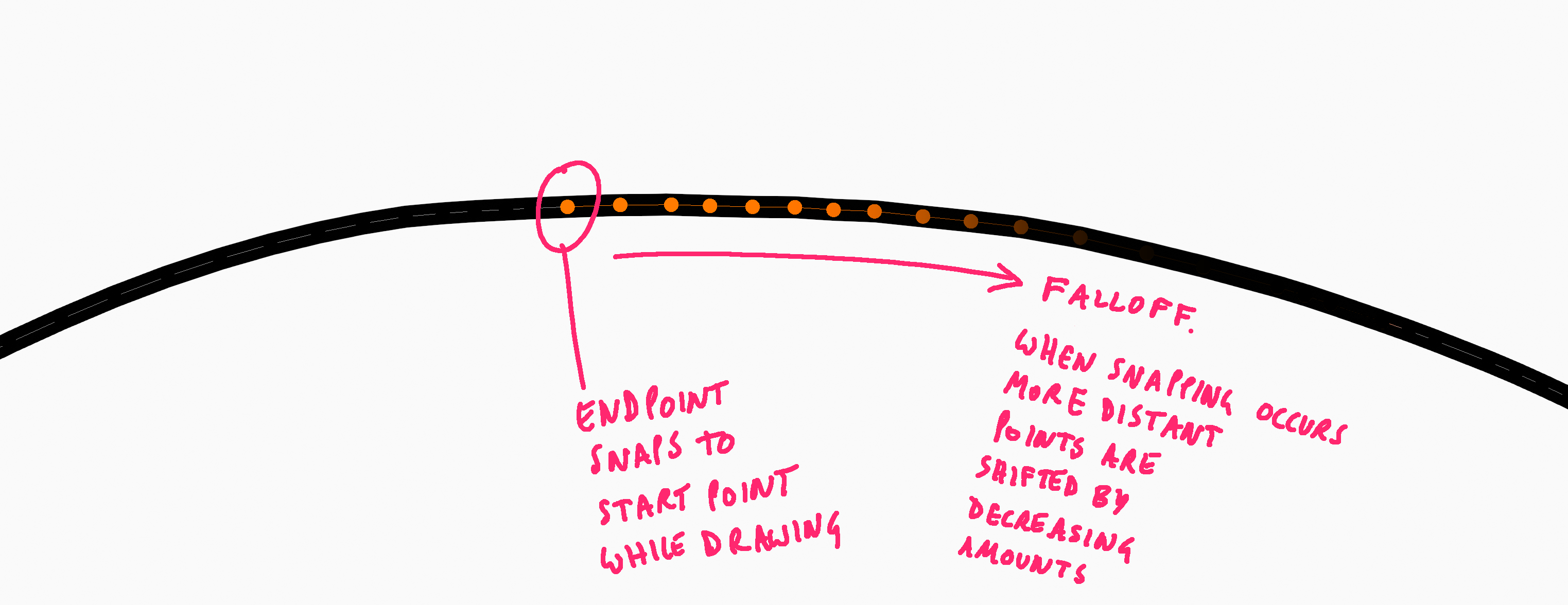
When active, while you're drawing a stroke, if the cursor comes close to the start or end point of any other visible stroke (including the one you're currently drawing), the end of the line you're drawing snaps to the position of that extreme vertex.

To avoid discontinuity with the rest of the line, previous points are also translated by decreasing amounts according to a falloff setting.

In case the user keeps on dragging past the extreme that was snapped to, once outside the snapping radius, the line end changes shape again (beck to normal) as the user keeps on drawing.
EDIT: While drawing, the line is displayed as normal (no changing shape) but when snap to extremes is active, and an extreme is in range, an overlay appears showing the adjustment that will occur if the user releases the LMB at this moment.

3 Comments
this should also include overall smoothing options, other than just one side of where it joins. If trying to draw an ellipse, it should allow a slider that takes size/proportion into consideration, then offer a geometrically perfect version if fully smoothed to say a value of "1". No smoothing being "0".
Autodesk Sketchbook Pro has had this type of feature for quite a few years. It would be incredibly helpful when creating hard surface type objects by sketching in grease pencil.
An older autodesk product that was discontinued, "Sketchbook Designer" was similar to Grease Pencil; in that it used curves as sketch objects. it also had a set of brushes that could be used to finesse the types of joint issues you have described. You can still find videos on Youtube that show it in action. It would be a great thing for the grease pencil developers to take note of, and perhaps look at for inspiration.
Just found this forum while searching for this feature. Its absolutely a must! Working in 3d with a pencil/tablet is one of my i Ideal 3D workflow! It would almost replace a CAD program for concept design! It should also snap to other existing grease pencil lines and endpoints! GP is already powerfull but it lacks a bit of precision. Is it hard to implement it? I really look forward for this!
Great Idea! I think the snapping tool you propose could be expanded even a little bit more ( if I am reading this proposal correctly).
I would like to suggest:
( I can not include the image I made but you would include a "Snap to Start" check box :
Snap to ends:
Controlled Snapping to stroke end is a good idea. I believe it can be made better with controlled Snapping to stroke start
PS. if we want to get crazy with snapping as a workflow. Imagine being able create a 3D Grid and then be able to snap stroke to any vertices ( draw between any two vertex not just start and stop and have the stroke snap to the vertices)