
Outliner Expand/Collapse Buttons
Hi,
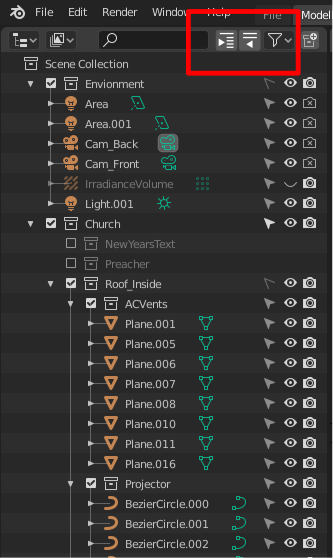
When i have a large project with lots of collections and objects. If I want to expand the ENTIRE tree (or collapse it), I have to click on each arrow next to each individual collection. I had a stroke last year and using my mouse is difficult. I do use a tablet to replace my mouse. But if I have 15+ collections this gets very long and tedious. Is there a shortcut key to do this? if not, how about adding two button to the outliner for expanding/collapsing ALL collections> See screen.
7 Comments
numpad - numpad +
* @Pawel Piotrowski * Awesome... Thanks. It would still be a nice feature to add for those who don't like shortcut keys. My memory isn't always up to par sometimes, i forget shortcut keys.
* @pixelinkmedia * it is also in rightclickmenu
You can also hold Shift and press the expand/collapse arrow and it'll do this.
since the outliner project was selected again for 2020 GSOC project, you could ask there once the 2020 thread is started. devtalk.blender.org/t/gsoc-2019-outliner-improvements-ideas/7185/420
Just sayin': this is something C4D, whose outliner has MANY GOOD IDEAS, has been able to do for quite a while, and with a lot of bells and whistles.
Besides having a hotkey, a RIGHT CLICK CONTEXT MENU option would be good too, and 'discoverable' -- something the devs have indicated they want to promote. --You shouldn't need to know any secret handshakes to operate a piece of software.
* @jeric_synergy * It is 3D software. Very big, very complex, very raw. So it is impossible to make all visible. Now for discovering they made menu-search. So you can type and see where it is.