
Mesh Parenting a Collection needed
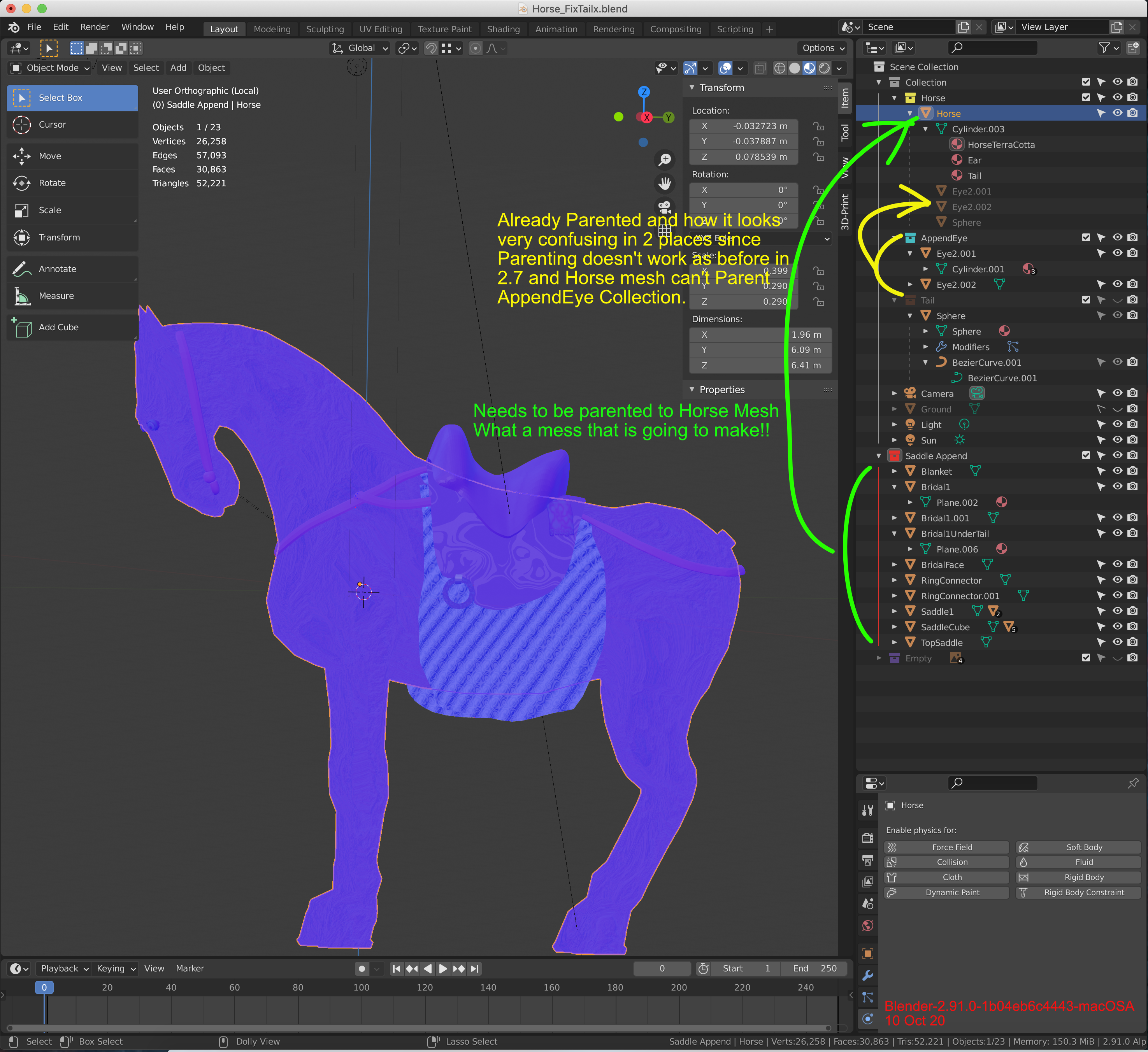
See image uploaded. I have a mesh of a horse that has all the items on him that need to stay on him as he moves. When I try to parent all the items I made under a new Collection, I can't Parent this collection to the mesh as needed, I have to move all of the Collection's items under the Horse mesh and this makes a MESS of unrelated items under the Horse mesh. I have had to do this to have his eyes parented and the results are in Yellow. All of the items in Green need to be dragged under the Horse mssh but WHY? This defeats the whole concept of the new Collection system!!! It looks SO GOOD like it is before having to DRAG the individual items under the Horse listing. Can't there be a Marker of some kind instead next to the Saddle Append that shows it is Parented to the Horse mesh instead so that it can all stay clean and organized???? Previously entered on Blender.Today in more detail: blender.community/nodes/5f861aba9c122142f0416bc4/edit
4 Comments
Well, as I understand parenting objects (hierarchies) and collections are different concepts. A Collection of objects should not be treat as a way to "hierchisize" objects. If you want objects following another one you have to create a hierarchy. You can't parent an object to more than one parent, but you can place on object in multiple collections.
It seems like the problem you are having is that in the View Layer mode of the Outliner, Parented objects appear both listed under their parent (darker) as well as under the Collection they are a part of. Collections is a very useful way to group objects without affecting their parenting hierarchy, however I feel your pain.
You can filter the Outliner view to only show the parent child relationships by checking off the Collections checkmark, or only collections by checking off the Object Children box. It's not ideal, as you can either only see parent hierarchies and no collections, or only collections and no parent child hierarchies... But maybe that is what you are looking for ?
I try to understand, do you mean that the children should automatically follow the parent in its collection?
* @moonboots * Yes, the saddle should stay on the horse, along with all the other items marked by green listed in the collection. Prior versions made Parenting easy by dragging and dropping and having the children indented. I need to parent all of the items in the Saddle Append Collection to the Horse mesh. As it is, I can't do this and need to parent each item separately under the Saddle Append Collection to this horse mesh. The results for doing this would look like what I have done with the example of the horse eyes in AppendEye Collection marked in yellow. SO now I have the same items listed in two places in order to keep the eyes with the horse mesh. The problem with this display should be obvious:
the parented horse eyes (yellow) under the horse mesh, now parented, are creating a redundant listing of items that are no longer grouped or referenced to the Collection where they are named and WERE easy to quickly identify.
Following what must take place in the example of the yellow-marked items, ALL of the Saddle Append (green) items will have to be similarly be parented and listed under the Horse mesh as the eyes were -- creating an increasingly long listing of items in two places, but the horse eyes mixed with the saddle items starts to make the Collections concept irrelevant and messier than just building random, unrelated items parented to the required mesh from the beginning.
My suggestion is that there needs to be a way to parent the whole Collection and have the name of the Parent on the line next to the Collection Name to the right of it. Then nothing needs to be moved or added to the clutter under the Parent as there is now.
This situation makes me want to give up on Blender as I see how confusing a simple example of trying to do a horse with saddle is going to become to make it move. I have yet to add scenery and the Collection system as it is is becoming confusing. I often select items by using the listing rather than clicking on the screen--the dilemma should be obvious--which of the now duplicate listed items to click on .....