
Portals for nodes.
I'm not kidding XD
After seeing a mockup of Ton showing a cloud of nodes in 3D, I tried to give a flat solution to the complexity of the connections between nodes.
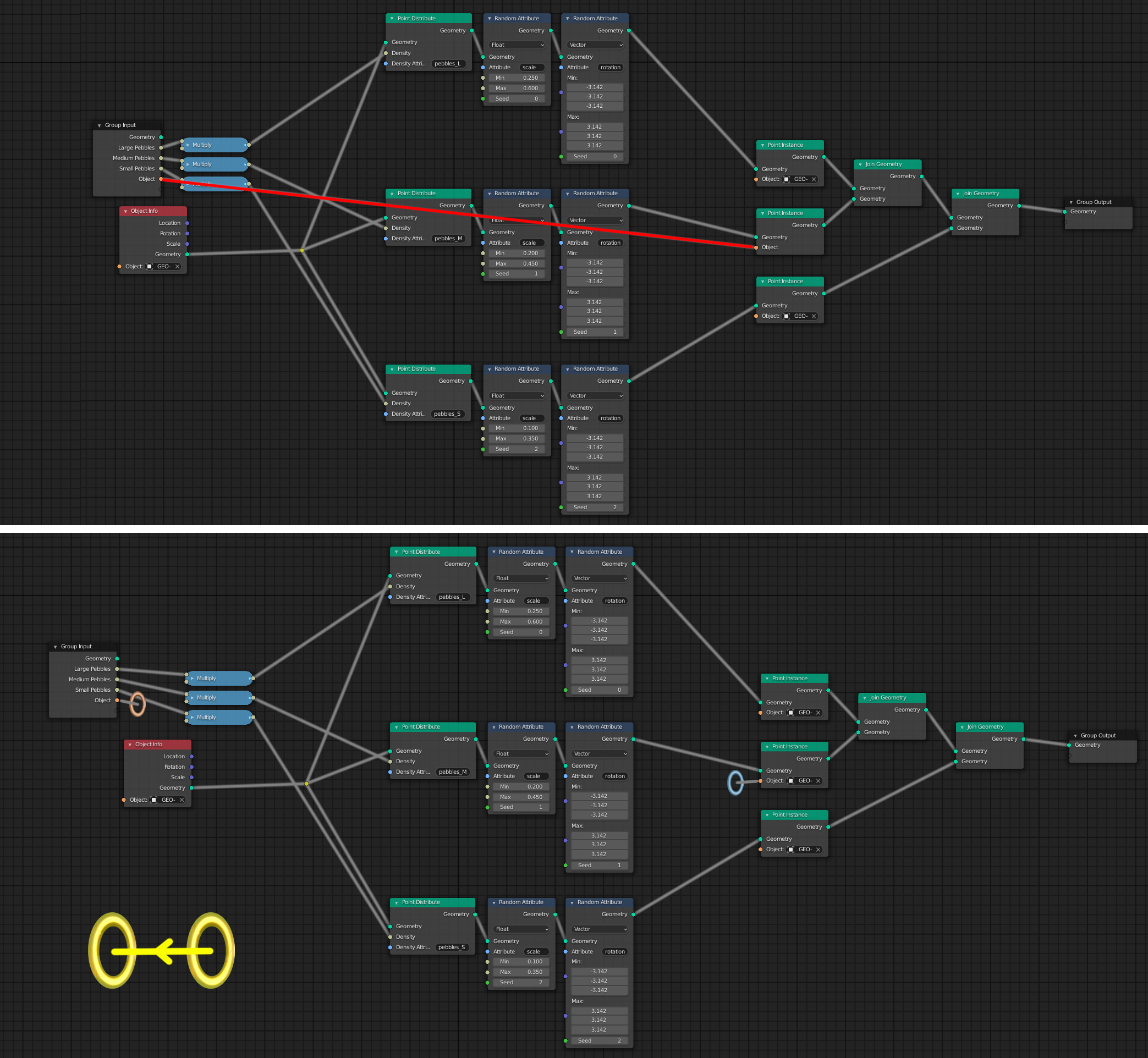
The first image shows how when exposing the attributes in the new branch of Geometry Nodes, for example, although the line is not red and does not stand out so much, it crosses the rest of the nodes. Obviously you can do a super cabling to avoid the rest of the nodes, but I think we have to find a solution.
An alternative would be to have more than one node to expose the attributes, but the outputs would be scattered throughout the editor. It is not very versatile either.
The portals allow you to hide the wiring and show it only when one of the two portals is selected. They should have an input color and an output color (orange and blue) and selecting either of the two should synchronize the color (yellow).
An arrow can indicate the direction of the connection by hovering over it, and by double clicking on one of the portals the view should travel from one portal to the other through a transition, when it cannot show both portals at the same time.
To move the portals it would be enough to drag them, and to create them Ctrl + LMB would generate the couple.
A little crazy, but I think it might work.
22 Comments
" Teleport " something sounds too weird... Would be better IMO to implement special I/O nodes. Maybe some " Reference " word better for such nodes. User connect output to " Reference In " node input, also user give name to this reference. Theu user can call " Reference Out " node, choose & use referece from list. Of course it has restriction in upstreaming tree order, user can't call reference out before set it. Selecting one of such node will show (usually hidden) influence wires to highlight reference IN and all OUT's belong to it.
* @IIIFGIII * Something like that I was thinking, like a cable manager that would allow more than one cable to pass at a time and that this organizer could stand out or go unnoticed. I think your design solves the shortcomings of mine. I'll study it better tomorrow.
* @IIIFGIII * This design is how SILworX, a PLC programming tool allows users to avoid messy connections between nodes. So I'd say this feature has proven itself in practice.
Devs, may God bless your hardworking hearts - we need this for yesterday. 😩
Yes, please. Blender nodes lack of portal/SetGet/reference or whatever it might be called insde Blender
Node even in simple setups can quickly become spaghetti, with random lines cumming in different directions.
eg. of other software: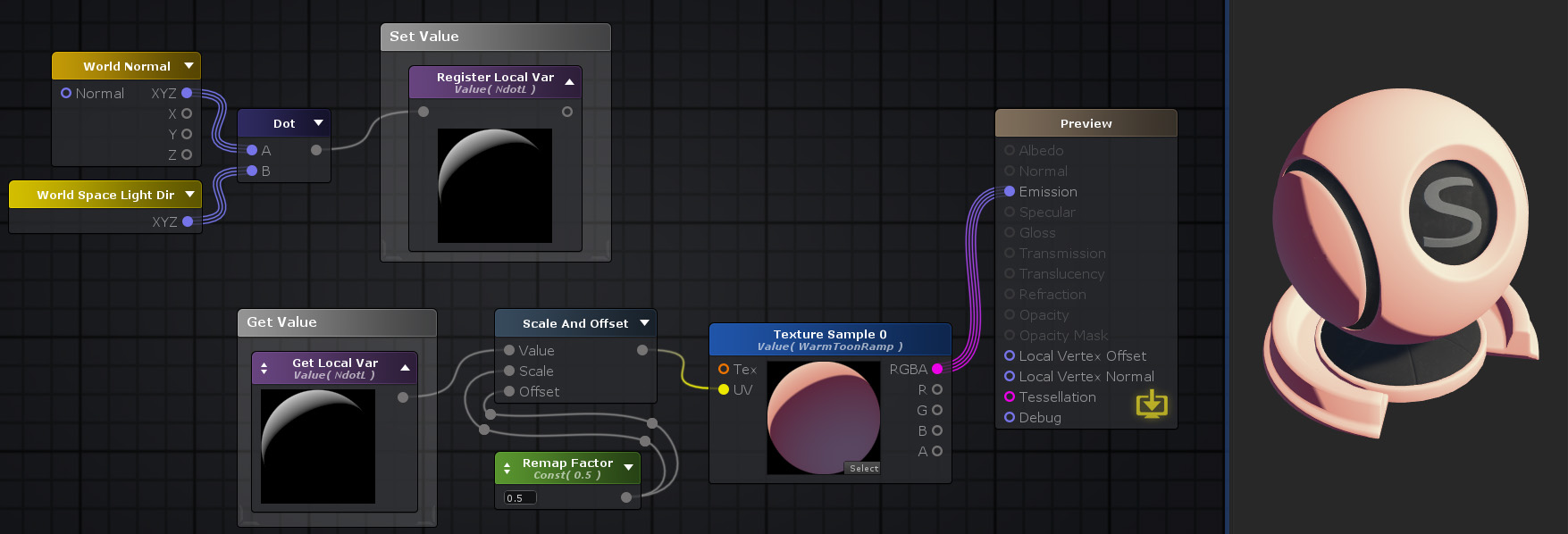
* @Pawel Piotrowski * That looks way more interesting to me!
I don't really see this in production. One pair of portals looks funny and nice, I give you that. But when you have a spaghetti bowl of nodes, I don't think it will give more readability to replace some simple straight lines by colored oval shapes that don't even tell you where things go at a glance. We lose information for not much clarity.
* @-L0Lock- * The idea is more conceptual than anything else. I think I'll have to rephrase it to be taken seriously. I will continue to receive feedback and then try to provide a more formal solution.
I like the idea in general. Maybe not a portal but finding a way to highlight the line only when you need it. for example by clicking on the node.
* @pipeliner * It is not so futuristic, but it could also be a good solution. XD
Already suggested . Duplicate.
* @ Vyacheslav * Right, I hadn't seen it! it wasn't that surreal either. So I vote for your proposal XD.
Can't you just add a duplicate of the node? In your example you could just duplicate the "Group Input," node and move it closer to the output, not only solving the initial problem, but also making it easier to know what the "Point Instance," node is actually connected to
Having portals works nice with 2 portals, just like in the game, and maybe with 4 portals like in Portal 2, but after that it becomes really hard to differentiate the slight variations in color at a glance, and you would frequently have to go hunting for the other ends.
This is not crazy, this is the principle of setting and getting a variable and would be very useful.
Great idea. I think you should be able to add a name to the portal, and when you click it, it should show the hidden connections.
Why don't you just duplicate the input node and place it next to the node you want to be linked? I do this all the time and with Ctrl+H I hide the inputs I don't need.
I guess many people underestimate the versatility of this solution when it comes to have neat and clean nodetrees.
* @ Lsscpp * Although I had not thought of it exactly as you say, my idea was to avoid what you suggest, and provide a general solution. More than duplicating, I think that what should be done is to instantiate nodes, since at some point I have had to duplicate the same node and make drivers from one to another. I take note, I think I could get juice
I never knew I'd live to a day where we'd need portals in node editing
I think this feature would be confusing to work with. Probably a better solution would be to simplify the node setup using node groups.
I think that if you simply just allow inputs and outputs to rotate around the node, it solves all of these issues. As trees are no longer forced left to right.
There is such conception in Sverchok add-on and I don't like it. It is impossible to track relationships in big tree.
* @___sv * Perhaps brightening the wiring and overlapping it when hovering over is a better option. I have not used Sverchok, but I do not see bad giving the option of temporarily hiding some cables. A general option of visibility (overlay) to show or hide the connections through the portals would be enough to hide the portals, if not desired.