
Controller Strips - A simple way to add user interaction
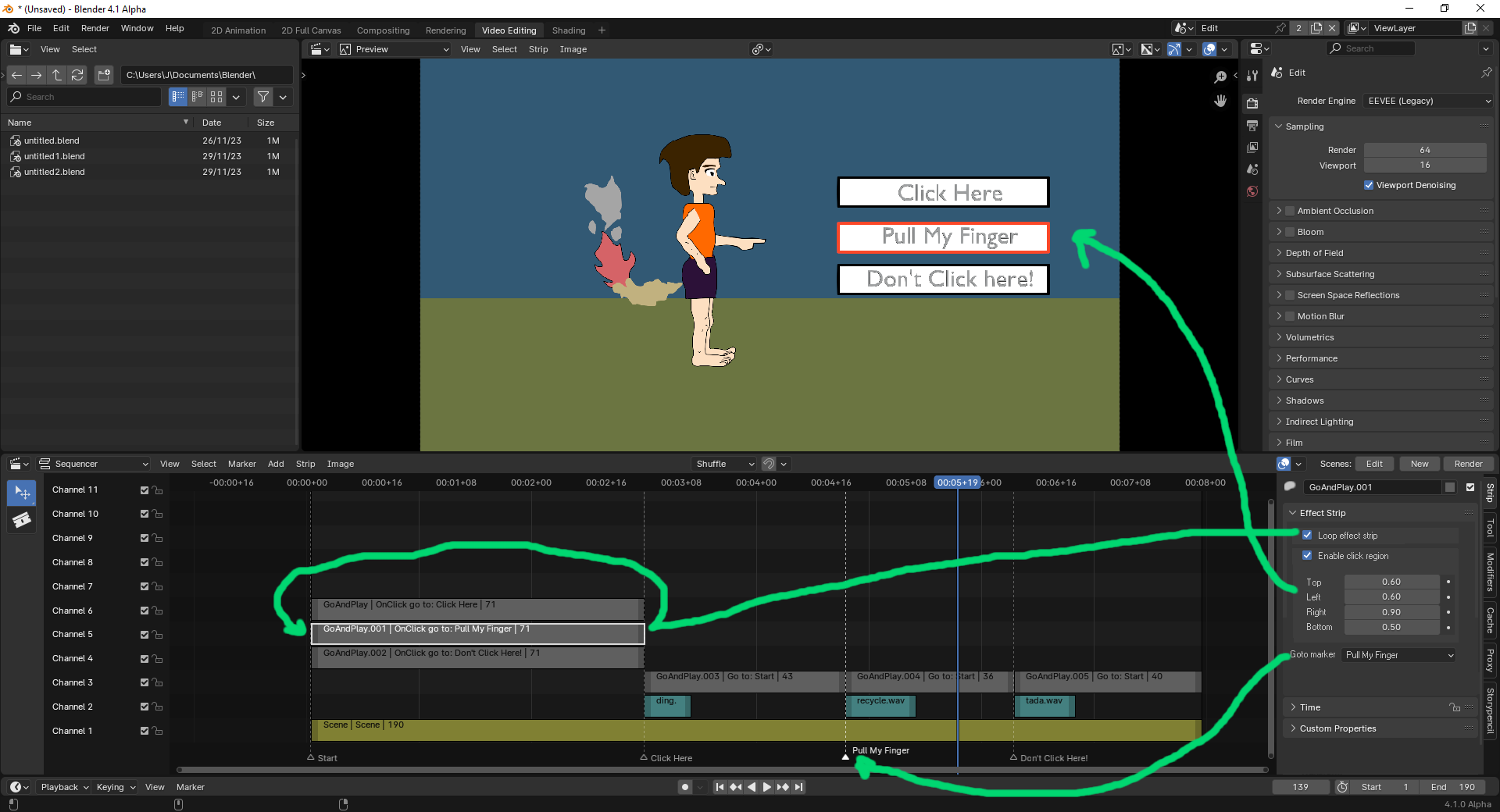
Add interactivity to timeline sequencer during playback with "controller strips". Controller strips are added the same as the other strip types (Color, Image, Movie, Scene..etc)., and define a CLICKABLE top/bottom/left/right or x,y,w,h region on the Sequencer Preview window, frame number/marker and loop option.
When the user clicks in the defined region, the playhead is set to the associated frame - OnClick Goto Frame ###/Marker and continues playing. If "Delay click" (not shown in picture) is checked the goto event will be delayed until the playhead reaches the end of the effect strip.
Boolean option to LOOP the effect strip - when the playhead reaches the end of the strip and "LOOP" is checked, the playhead is set to the strip's start frame and continues playing.
If LOOP and CLICK is not checked and there is a goto Frame/Marker defined the GOTO action would occur when the timeline playhead reaches the END of the effect strip (i.e. goto START).
Multiple Controller strips could be added stacked on different channels to allow for multiple choice.
It would also be great if the timeline play button had an enumerated option for the preview window to "Play Fullscreen".
EDIT - I mentioned this on another Blender artist site . Below is a mockup on how interaction could be setup.
0 Comments