
Double Right-Click Select
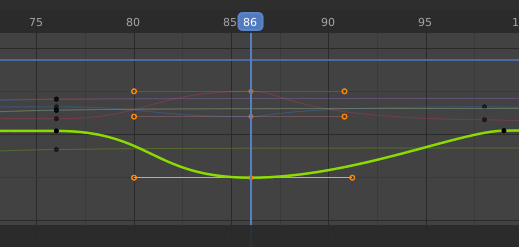
Default double right click for selecting all keyframes at the current time instead of "Ctrl+K".
(Just where is the 2D cursor; that exactly bunch of keframes aligned vertically).
I think it should be more intuitive or consistent with the idea of selecting a loop in edit mesh mode.
It could be "mouse over" instead of at 2D cursor.
...And when we do this, it could deselect all other keyframes selected, unless we hold "Ctrl" or "Shift" to select more "keytime loops".
4 Comments
Or double left click for left click users. Yes. Add a way to select an entire curve and suddenly animation become way more practical. Maya does it via clicking the curve where there's no keys.
* @-L0Lock- * "clicking the curve where there's no keys." looks awsome! Today we have "L" to select an entire curve in all timeline, but it is based on the selected keyframe; I think it could be mouse over like in object mesh edit. But this could be another propose.
Double right-click select? Genius. I like it.
Although, I think A would be the most intuitive shortcut for selecting all keyframes. Edit: It seems as though "A" works for selecting everything in the graph editor. Am I missing something?
Do you mean select linked? Couldn't that be L? I don't use the graph editor much, so sorry if this is a dumb question.
Control+K seems to be a more advanced select all feature.
* @BlenderSplendor * The proposal is "Default double right click for selecting all keyframes AT THE CURRENT TIME..." (Just where is the 2D cursor, that exactly bunch of keframes aligned vertically).