
Leaving quad-view brings you to the view under the cursor
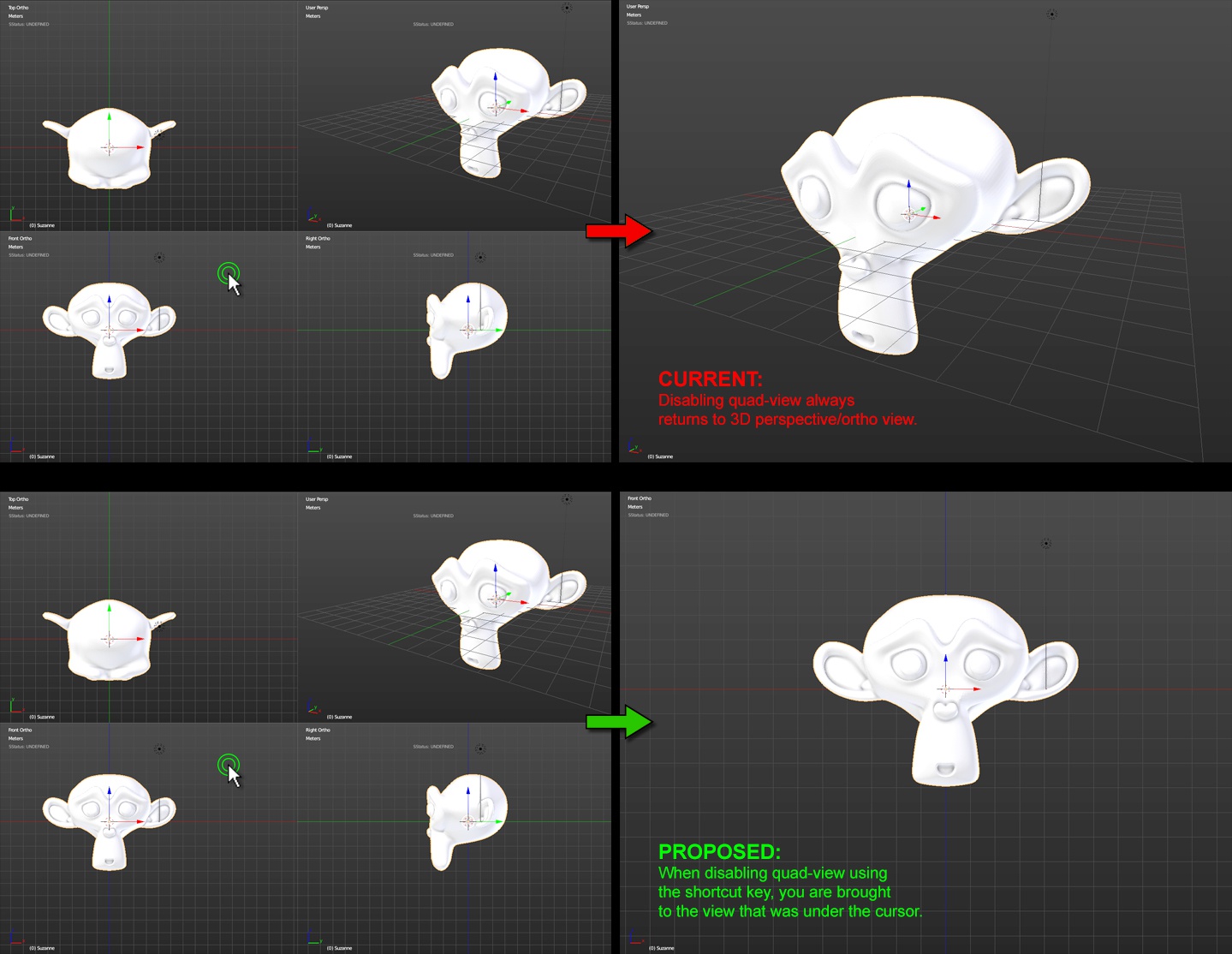
Currently, if you leave quad-view (no matter the means of doing so) you are always returned to the 3D perspective or ortho view (depending on which was active).
When constantly moving between the quad-view and other views this forces the use of keyboard shortcuts (which are natively bound to the number keys - far from the left side of the keyboard where your hand tends to rest) to get to the various face views.
Instead, I propose that when leaving quad view via the keyboard shortcut, you are instead brought to the view that was underneath the cursor when the shortcut was invoked.
UPDATE It has been mentioned that unchecking Display Properties > Quad-View > Lock allows this functionality, though it is checked by default.
However, the way in which Blender reacts to toggling between quad-view, a single view , and back to quad-view with Lock disabled seems counterintuitive. If doing so on any of the three standard ortho views, when returning to quad-view the upper-right view normally a 3D perspective) will become whatever ortho view you were viewing.
see Chris Offner's gif here: gfycat.com/ElatedMessyGiantschnauzer
Instead, I Blender should remember the last non-Top Ortho/Front Ortho/Right Ortho view you were using, and display that in the top-right of the quad-view.
8 Comments
Blender uses the location of the mouse cursor to determine which window is currently active, so this suggestion makes a lot of sense as the default behaviour, and would probably make the default Blender setup easier for laptop users without numpads as well as quad-view users in general.
Although I don't actually use the quad-view myself, I did find this way of toggling views very handy in Maya.
It has been pointed out to me in the forums:
>Under Toggle Quad View button in Display panel of view properties, there are options about quad view. If you disable the Lock option, you can obtain this behaviour.
My suggestion would there be, to make this the default behaviour, i.e. have Lock of by default. As the votes in here show, many people seem to be looking for this behaviour but don't know it's an option - like myself.
Wonderful tip. Thanks!
However, the way Blender handles this is... odd:
The top-right view is now set to Top view (*ie: toggling out of quad-view with Lock disabled switches the main view to whatever you had your cursor over)*
What view you leave quad-view from shouldn't change the views that ultimately display in quad-view.
I was confused by this same issue (which quad you jump in and out of) and started some threads on the forums last year. People told me the same thing, to turn "lock" off. However, with Lock off, you can easily screw up your quad views to be at weird angles, especially if you use a trackpad or apple mouse. I don't know why Blender has you go into an arbitrary window when change quad views and to fix it you have to edit that unrelated "lock" setting. I have basically gotten in that habit of ONLY using quad view because of this; just zooming in, using the small windows and not seeing as much screen as I would like. Blender has so many little details that feel so counter intuitive, especially for people that are just learning. They have updates constantly, I don't know why they dont add an option to fix things like this to work more like the standard 3d modeling apps.
Feel free to chime in here: blenderartists.org/forum/showthread.php
Feel free to chime in here: blenderartists.org/forum/showthread.php
Fully agreed. Both Maya and MODO operate in this fashion and it's expected and well-proven industry standard behaviour.
Maya
MODO
i support that behaviour 100%. it's essential.