
Smarter Windows Management
Hello
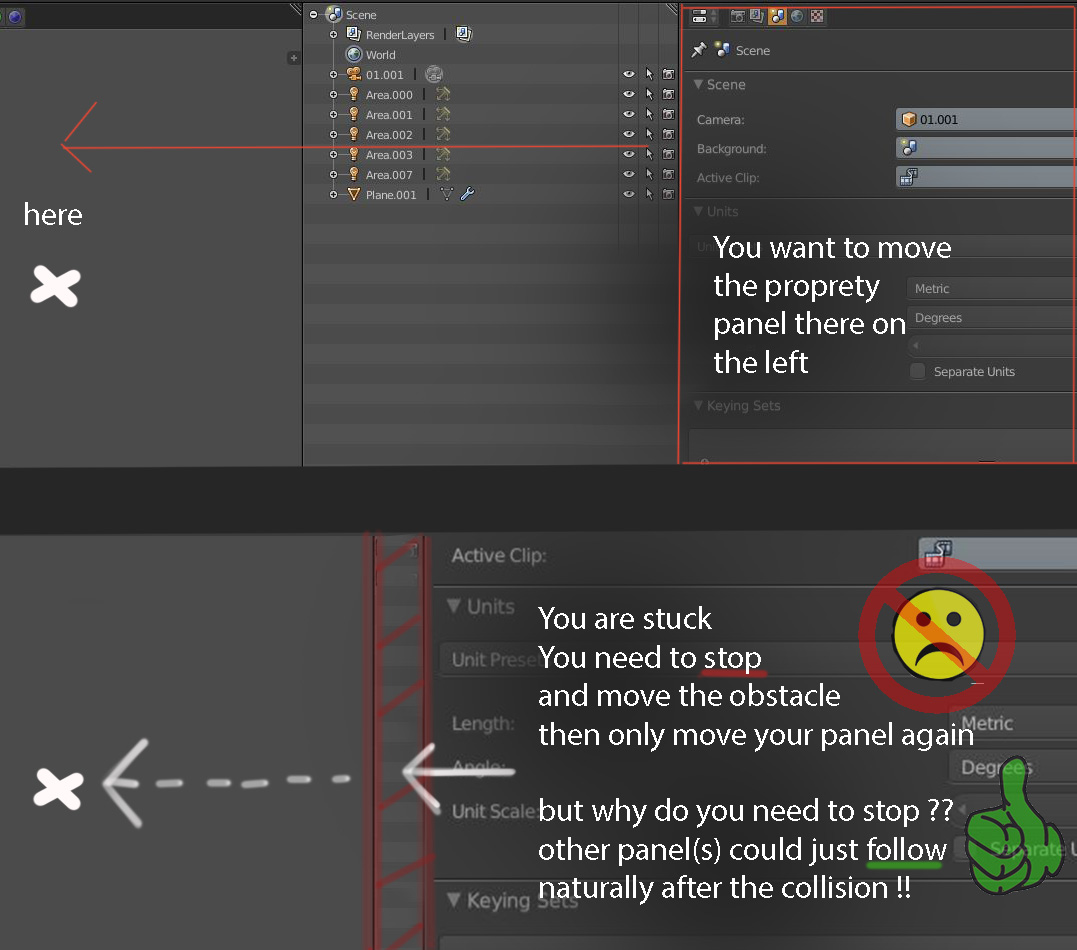
this is a small addition to the way we handle windows management inside of blender this method is simply the fact that a compatible windows could slide with the movement of another !
thats it , it could make our life really easier inside of blender
thanks
9 Comments
I have been thinking about this one and.. yes. This needs to shuffule the viewport or collapse them then move them when you drag windows over. I too hate the idea of having to shuffle the windows over one by one, and in a hierachy. It's a lot of work. There are no "drawer" systems.
Just to be clear, are you suggesting that the middle area in your example should auto-collapse when the edge is pulled over it?
@Jason van Gumster: not it should just follow the movement naturally , you shouldn't stop for the middle one
@dodododorian: I'm not sure what you mean by "follow the movement naturally". Are you collapsing that middle area or are you trying to swap the rightmost area with the left?
@Jason van Gumster: When you pull the far right window border, it will limit to the left window border edge (now you have to select the left window border, move, then the right window border again).
What we need is that the left window border will shuffle or collapse and them move with the right window border as you move the right window border.
@Jason van Gumster: divide the blender viewport in three horizontally , try to scale the extreme left border to the extreme right , you cant , you need to first move the middle morder , and its annoying at many occasion
@dodododorian: OK... so just to make sure I'm understanding this correctly. When sliding the right edge to the left, the middle area should either auto-collapse as you reach the left edge or when some pre-defined minimum is reached, the whole middle area should move left as a single unit. Am I getting that correct?
@Jason van Gumster: Yes. Shuffle shuffle. Instead of move, move to limit, move limit, move original again. Or Move limit, move original. Instead of just move original and have the limit move with you. Like a multidrawer.
on a corner of a space window press ctrl + drag on the space windows you prefer