
Floating Panel Line Option
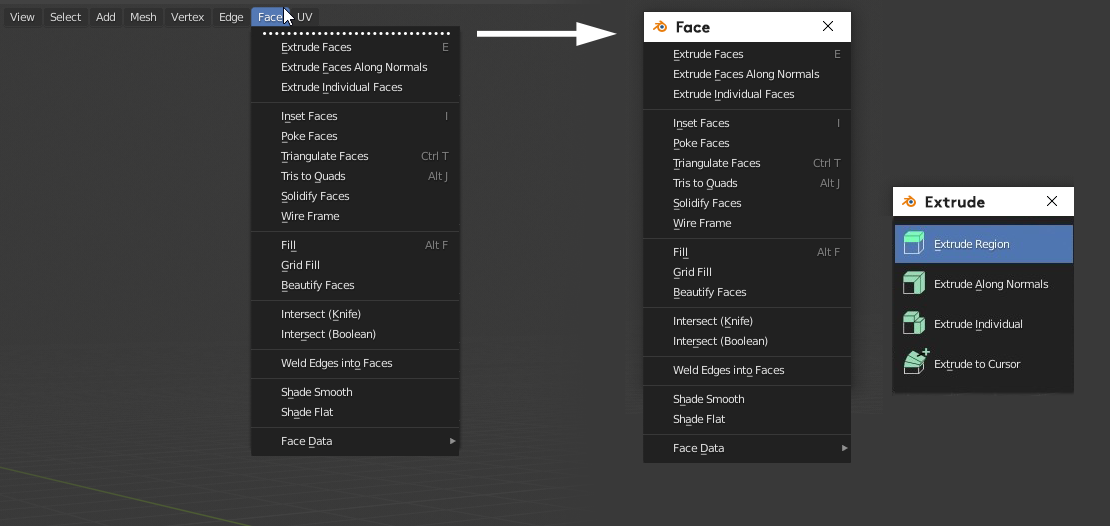
Hola, i was looking sometimes to keep a panel open to have an easy access to the same function. So add a little line at the top of every function panels to make it Floating, will be candy. It's a UI option that can be add to : Menus, Tools : Extrudes option , Selection , Quick Favorites
24 Comments
Favorites panel, custom menu editor is planned. But in general - learn how to use PME addon. It can do looooot of things. Most of time I work with fullscreened 3D View and not use default menus. And yes I start my career from 3D Max. Now Max interface for me is " wooden ".
You don't try understand Blender's advantages and philosophy. You just come from some autodesc soft and want to get Blender but some sort of autodesc Blender. Because it all you know. Floating this, floating that, floating everywhere. Just another one.... Have a luck.
* @IIIFGIII * happy to know that is planned ! Thx. You know floating panel it's not the way i work, it's just last time i found the panel Mesh/CleanUp really interesting and i wanted him floating for 5 min ;) . You know i come from XSI so don't talk me about Autodesk... But floating panel was in XSi, C4D, Modo, it's useful for 5 min but still useful.
* @FredT * Right now for same 5 minutes of " usefullness " you can do even more.
One case of my PME usege for example - I have 5 PIE's ( 8 commands each) on
~+Alt,Shift,Ctrlcombinations. It's snaps, snap targets, transform orientations, mesh visualization options, etc. handy things. I don't use all this menus mostly. Most common used by me things collected together in comfortable PIE's. All in fastest acess possible form, things happen in split second.None of pinned float menu will newer give same comforort and speed to use it. Extrapolate yourself from your other software experience and try to learn how to handle Blender and its advantages. But of course people are different - each have own way. Have a luck.
You do understand that Blender is context sensitive, so what does happen to these panels if you switch modes or workspaces, do they suddenly disappear or stay there but have no functionality.
That's why the Devs added quick favourites ,it works in all modes and editors. FYI Blender is anti-floating panels because one of it's paradigm is non-overlapping.
My suggestion would be making the quick favourites dockable in the sidebar and since it's context sensitive it will change accordingly,if there is nothing added then it will have the "No Menu item found...", this should at least make it easy for people to have their most used tools always visible depending on which mode they're in.
* @Pascal 0 * When things are out of context, the commands become greyed out of course. That's how it always works everywhere.
* @Regnas * So you'll end up with bunch of floating panels but their options greyed out, I would rather have dockable Quick Favourite instead or maybe even a floating one ,that would make it much more cleaner than what the other Softwares do.
* @Pascal 0 * Don't worry, they are dockable too of course. 🙂
* @Pascal 0 * My quick favourites list would be 75% shorter if I had this feature.
* @Pascal 0 * This feature can be REALLY usefull when you just want to test a series of functions from a menu (when you're new like me) for exemple. Not being able to make a floating panel was one of the most frustrating thing i discovered when i came from maya
* @david.rafael95 * Like i said different softwares have different paradigms,I give you an example Blender has load UI by default so if you open someone's else file you'll get dozen of floating panels when the file was saved that will be fraustrating too especially for developers getting bug reports.
Also Maya doesn't have workspaces working with modes so when you switch between them they won't affect these menus and there is probably even more problems that we may not know from a technical level......all of this has to be taken into consideration when developing such a feature.
So saying it's useful when just testing is not really a good argument for it.
That would be awesome. BUT WARNING, blender users they hate all sort of floating things. Stuff like this was already suggested many times, and the feedback from users were horrible. LMAO.. Watchout.
* @Regnas * They are the same people from a decade ago who insisted UNDO was unnecessary.
* @thinsoldier * Wrong, users opinion doesn't matter much, you have to convince Ton and the Devs who are so against it, because they hate floating Panels, they're the ones who decided not to include them in the inital Design.
From my perspective as a user, i had to ask how this will work in Blender...it's easy to say give me this feature from this X software without taking into account the design and paradigm differences which could cripple the software in the long run.
* @Regnas * the issue is not about floating things. The issue is that Blender relies on context and modes, and floating palettes like this won't work very well in practice because of that.
* @billrey * Many programs have context and modes. They grey-out menu items that are not relevant to the current mode. I think blender only just recently got this feature for some menu items. There is also 1 very important floating thing that looks like it could be the foundation of this feature: If you press Q to the open the Quick Favourites menu and then click and drag on the heading text "Quick Favourites", you can actually drag it around. All it needs now is a way to make it never disappear and a way to replace its contents with the items from some other menu or submenu.
Floating panels are super useful. But hey, if you don't like them, just don't use them...
This is fantastic, and is very usefull. We use some branch of commands frequently, and this would help much when you are doing a task with repat command. My opinion , of course.
Bforartists has tackled this UX in a number of ways within the architecture limits - it's a fork, but addresses usability issues, also free, with distributed executables and opensource:
{attachment bforartists_2020-02-18_07-43-17png}
{attachment bforartists_2020-02-11_13-08-28png}
{attachment bforartists_2020-02-18_07-43-35png} default is just 1 row, but I like 2
I love the idea of tearable/pinnable menus. They are such huge time savers and a great way to customize the UI to how you want it. Softimage, Max, Maya, Cinema4D, and others all have had this for eons, and with zero complaints. The common denominator is what we would call "industry standard" mainly because it's a tried and tested workflow that gets the job done. Right now the Blender architecture doesn't allow for this and would require a huge rewrite - but pinnable, collapsable and reordable toolshelf button groups can be and will be a thing in Bforartists, atleast. ;)
* @Andres Stephens - Trinumedia * First 3 are nice. But the #1 reason noobs struggle in maya and max is the initial overwhelming noise of their UI's tool shelf. That is one thing I hope to never see in Blender. Older 3d programs believing that EVERYTHING needs an often meaningless/useless icon has held back the progress of their users and the size of their user base.
* @thinsoldier * ...numbers do say otherwise, thus I beg to differ. The way the brains visual to motor system has evolved to work needs form, silhouette, color and shape to instinctively know where to move and select things quickly. It's science to use iconology for good UI for a better UX. To have to rely on exclusively reading, non-colour icons, and lineart only icons (no form nor silhouette) is accumulated milliseconds of brain power that is a learned ability, which requires more energy, thus is slower to use as a replacement for our built in visual to motor skills. It's not efficient. The latter is not pretty, but at the end of the day.. what works with the way the brain works works.
Also.. it's language agnostic to use iconology to learn operators, so easier to learn for beginnrs where English is not a first language, and where their literal translation makes no sense.
I would consider traditional 3D software harder to learn because of it's bureaucratic and aged workflows, not UI, eg. where you have to follow a checklist of steps to do certain things. Blender is by far not an exception to that UX bureaucracy and is also as aged and hard to learn - so I don't think you can really say these difficulties are because of a lack or excess of iconology that makes things difficult for anyone. eg in Blender: Hold down ALT to apply to all property changes to selected (doesn't work everywhere, thus you have to do things one by one by one), move mouse to 3D View after selecting in Outliner to then be able to delete the object by hotkey, or in Max, you have to select a drop down to change the viewport display type, etc, etc etc. It's the UX that requires multiple steps for simple tasks that makes things difficult, not icons. Icons are an optimization.
* @Andres Stephens - Trinumedia * countless decades long maya users disable damn near the entire UI and just use the hotbox which reduces the number of icons you see to even less than Blender. I have seen thousands of posts over the last 20 years where maya users say they wish someone had shown them how to work that way from day one.
* @thinsoldier * Yes, using only motor skills will ultimately be faster - but since it's a visual software, training motor skills for hundreds of operators is extremely taxing and not efficient unless you specialize. I'm sure those you mention only use their motor skills (muscle memory) to work as specialists.
Though, with that said, visual to motor skills will any day still beat reading an operator name, and it is still faster to pick up than training a motor skill with no visual feedback. Think of picking out a color of a shirt you like because you know how it looks compared to learning the piano (which requires years and daily practice). When it comes to learning, visual to motor skills is best to pick up functionality and train quickly. When it comes to practical efficiency, yes, I agree with you, muscle memory will ultimately be more efficient- but the energy investment to be good at it is just too high when we have a visual monitor and UI to look at to cut corners.
Also.. sadly, you can't train muscle memory without visual feedback and assimilation efficiently either.
Again, whatever works works - and yes, a pro should and would only rely on muscle memory.. but only after an investment to train that way, which is frustrating, taxing and not energy nor time efficient (till you learn it, then viola! Speed and efficiency.)
This then goes back to the original counter you mentioned - it's taxing to learn these softwares - and more so because it's "better" to use muscle memory exclusively to work with hundreds of operators to be as fast and optimized as a specialized professional should be. You confirm that only muscle memory based UX is the way to go, which is harder to learn, which promotes your argument: that both Max, Maya and Blender are hard to learn due to that requirement to be industry optimized.
But in turn, iconology still does not work against training muscle memory, only optimizes the learning process. And as always, you still should be able to get the option to go fullscreen, depend on muscle memory, which Bforartists still gives, and just work.
* @Andres Stephens - Trinumedia * "motor skills" ??? No, hotbox is just a big menu with lots of text and some icons to the left of some sub-menu items. There are some gesture based things in Maya similar to the ~ or Z menus in Blender but the hotbox is mainly regular old menus as an alternative to the icon overload of the standard Maya UI.
And as a color challenged person with poor eyesight I can see these words and understand them 1000x faster and better than i can see most of the icons in Maya. And even with the icons I can see I don't always comprehend what the icon is trying to illustrate. I spent A LOT OF TIME in Maya hovering over icons WAITING for the tool tip WORDS to show up to tell me what the **** that icon did.
A combination of menu heavy and keyboard shortcut heavy and some icons for a few key things approach seems to be the best in my opinion. That makes Blender top of the charts in my book (although there are still a few things that I cannot find in any of the menus and seem to only exist as a keyboard shortcut on toolbar icon :( )
Every long-time maya user I've spoken to swears by turning off all those ******* icons and every Blender youtube channel I've seen (and I've watched almost nothing but blender content for the last 11 months) swears by the keyboard shortcuts.
* @thinsoldier * Yehp. I have used this and spent way too long reading to learn how to use it well, it was just too much effort to use it well, so I disabled it. It's a pie menu in essence, and does end up being muscle memory gestures unless you stop and read each entry you want to grab quickly. Words are not icons, the brain can not see them at a glance.