
Displacement modifier for Curve Objects
Hello,
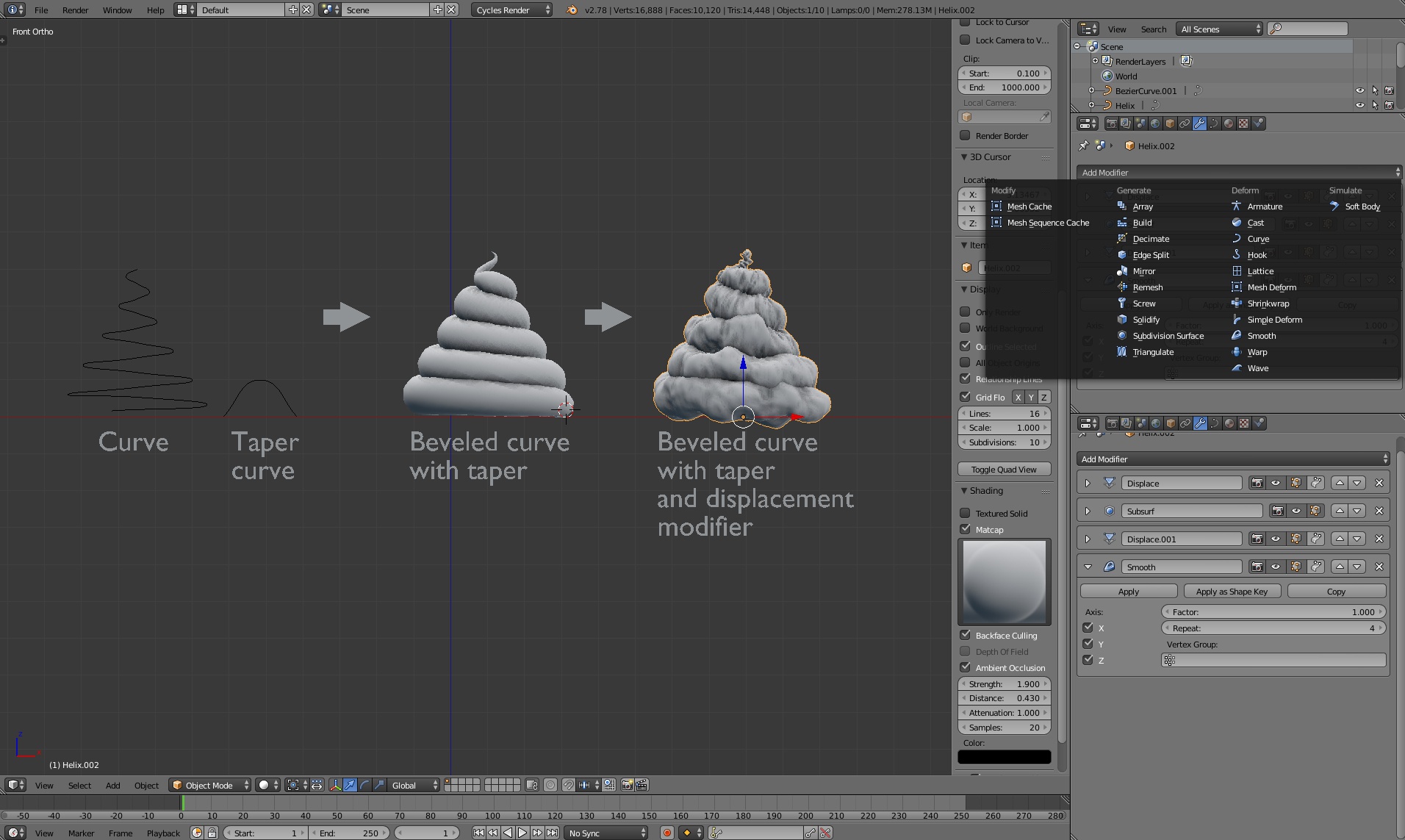
A while ago I had to make an ice cream and I did it by making a curve helix and beveling it, but then I wanted to add a bit of randomness by using displacement modifier. I did not want to convert object to mesh, because I would lose some of adjustable functions. And sadly I discovered, that displacement modifier is not an option for curve objects. So I tried and tried and as a random accident I managed to copy displacement modifier from a mesh object to curve object by using "copy attributes" addon. To my surprise that worked like a charm, no bugs at all! So I really don't understand why it is not possible to use it by default? This is very useful in some cases!
See the image I made as an example where I used the same method to add it to curve.
6 Comments
It still work Blender 3.0? becouse I try and nothing happening
I am not able to replicate this. I have a BezierCircle mouth on a claymation style character, and I can't get the displace modifier to copy over. The Subdivision, Armature and Remesh modifiers transfer to the curve object, but not the displace. I am using the Interface Copy Attributes add on, but it appears to be ignoring the modifier which is not built for curve objects anyway
That's exactly what I need as well!
I guess this will be sorted out after 2.8 release as part of Nodes Everything plans.
so that's an icecream... :D
:D Well, the actual result is here (which is also not an icecream): twitter.com/HypnosisGroup/status/699254285767438336