
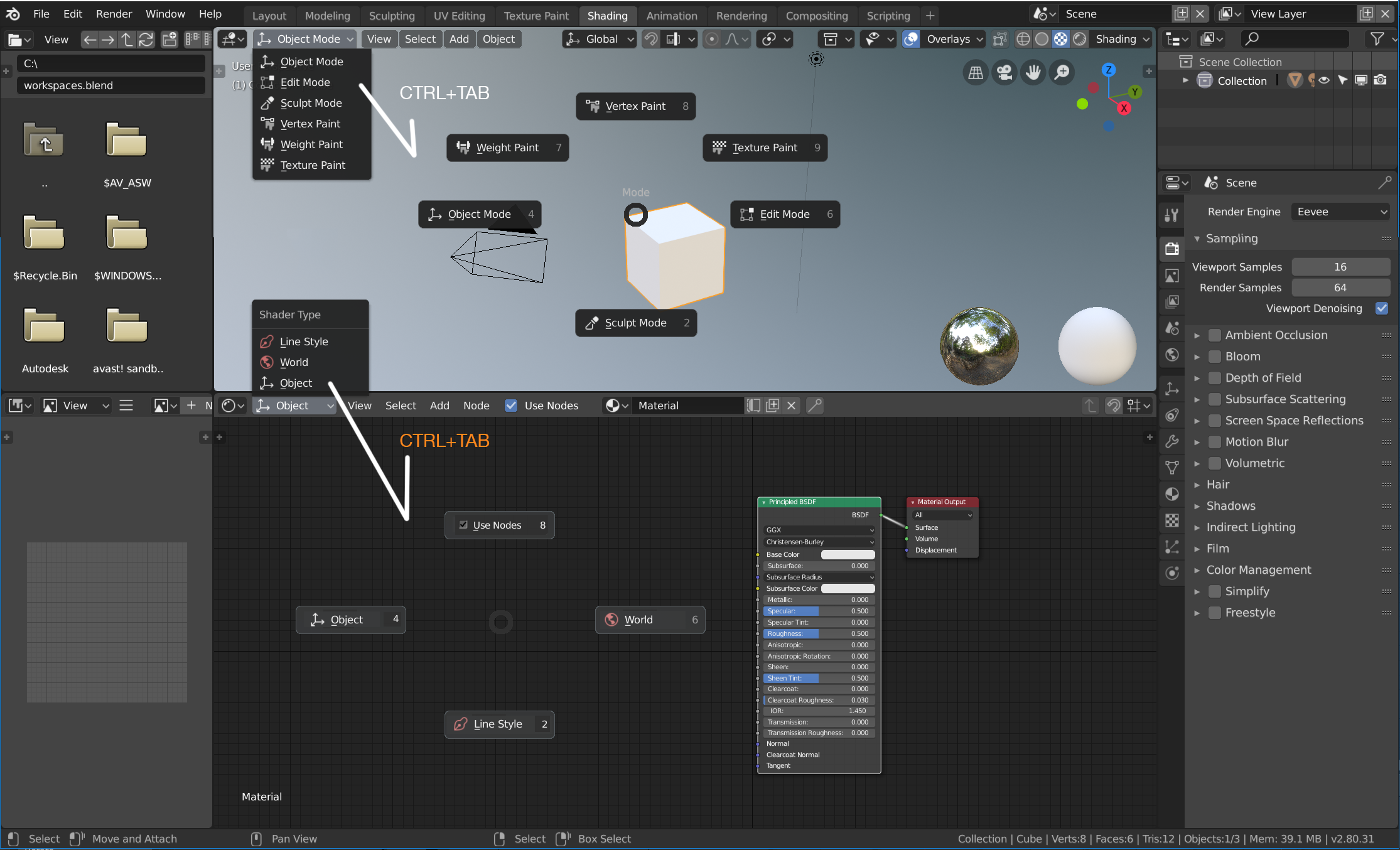
Shader Type fast switching with Pie Menu using CTRL+TAB
Since Shader type (By Object, World, Line style) in Blender 2.80 was moved to the drop down menu, it is little frustrating to have to click two times (first to the drop down list than to the Shader Type), for someone used to Blender 2.7x. World and Object shader type needs frequent switching in the shading workflow, and solution that is very clear and faster than in previous Blender by using unassigned CTRL+TAB shortcut to execute pie menu, which uses the same logic in the 3D Viewport for Interactoin modes (Object, Edit, Sculpt..), by using the same CTRL+TAB shorcut key. I think this shortcut will work intuitively for accessing the menu which is on the same position/alignment relative to the corresponding Editor Type (3D Viewpont/ Shader Editor)
3 Comments
yes, it would also be nice to have a Favorite NODES "Q" menu :)
just use PME ;)
@Oleg Kondratov: That is exactly what I use in 2.79 :) IMHO if the CTRL+TAB is unassigned already, it could use the same logic as in all panels