
Navigator-Gizmo Adjustable Position
I think you should be able to adjust the navigator gizmo position.
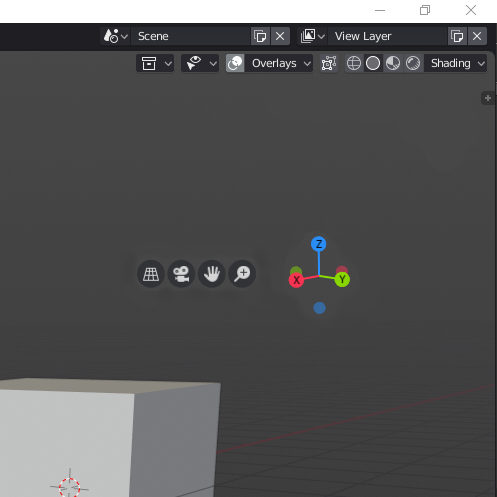
I tried Blender 2.80 once at a tablet with a pen and it worked very well. You can do almost everything without a keyboard. But I encountered a problem regarding the navigator gizmo. If you are working in fullscreen and want to tab and drag to the top or right there is the end of the screen. Here a fancy picture that illustrates that. 😅

My suggestion is: Make it possible to change the position of the widget. And here are some ways this could be made.
1. You could right-click it and drag it to the position which is handy for you. For example more in the middle. (Or maybe on the left side of the screen so it is more practical for left-handed people who use a pen display or some sort of tablet with a pen) This should work with either the right- or left-click select preference.
Extra note: It might also be useful to move the four buttons and rotation gizmo separately in the case you rotate the viewport with one of the buttons on the pen. So you don't need the whole gizmo.
2. There could be a setting in the overlays menu. Maybe the overall position or the corner where the gizmo is snapping to and a slider which controls the distance to the corner (margin).
What do you think? Did you also have this problem or did you just workaround it in some way?
I think it would be a nice addition to blender. In that way you can also have the gizmos closer to the space where you're working.
3 Comments
Well, having the option to move it would definitely be helpful. And I actually thought of another idea too.
Maybe it would be good to have it pop up under the mouse/stylus when you press a hotkey (in this case I feel it would be better for the four round buttons to be distributed on the four sides of the 3D axis). That way you don't even have to move to wherever you positioned it.
It would mean you'd have to assign some key to it but I think this could be useful if under it you add a compact menu with other settings as well. Maybe a colour pallet, brush settings or something else. Though I do feel like this is more add-on material than something to bother the developers with.
@Alexander Chaplin Braz: Yeah a compact menu might be a good idea. And I agree, it would fit better in an add-on. But just being able to move the gizmo should be a blender default thing, I guess. Also an option with which you can distribute the four buttons around the axis gizmo, like you said. Like the nav gizmo looked a while ago.
As a left-handed pen user trying to learn to sculpt with an android tablet screen-sharing on a PC, it would be very helpful to be able to move the gizmo to the left of the screen. At the moment, if I want to rotate the viewpoint, I have to reach across the screen, obscuring my view of what I'm trying to adjust. I'd find this change really helpful!