
[UPDATE] Smooth fur - Bring these features back to Eevee from Blender Internal
Edit:
Good news!! Most of the features in here have been implemented or exist one way or another, including the surface diffuse which can be replicated with geometry nodes, transfering the normals of the surface as an attribute to the shader. You can still read the original post below. Huge thanks to the blender devs for all of this❤ Marking it as done
-
Width Fade:
There's now hair transparency in with alpha hashed mode. Width fade is now possible with vector math, like Distance, between the tangent normal and the cylindrical normal, located in the geometry node, to get a fade from the center of the hair, and use that as alpha!

-Not casting shadows: This is possible now, changing the shadow mode in the material
- Flat shading : This is now possible if you use the Hair info node and plug the Tangent normal into the shader.
Original:
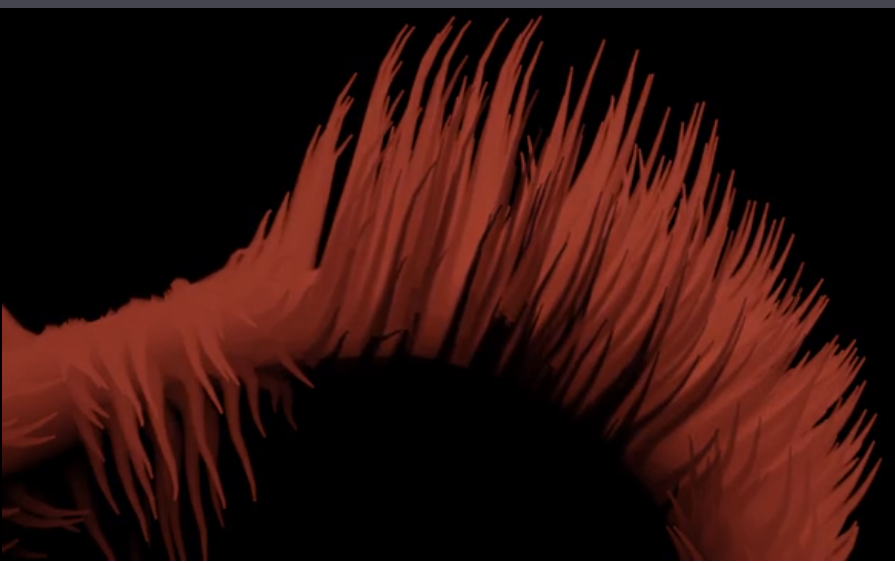
These features go hand in hand with creating stylized, smooth looking hair and fur. They come from Blender Internal's Strand rendering which was introduced with Big Buck Bunny. They were never really replicated in Cycles, but Eevee presents a new opportunity
- Surface Diffuse: This blends the shading of the hair with the shading of the surface. I used this a lot to create the illusion that fur was more dense, works better when the base material and the fur material have the same color. I think it's more appropiate for it to be called Normal Blending or something like that. This feature is understandable not in Cycles, where it would cause black artifacts due to termination problems, but Eevee should fair better<iframe src=' gfycat.com/ifr/AlarmedFriendlyKrill' frameborder='' scrolling='no' allowfullscreen width='640' height='360'></iframe>
Width fade: This smoothes the edges of individual hairs across their width. I even suggested a similar feature for Cycles a while back<iframe src=' gfycat.com/ifr/SkinnyHarshGermanspitz' frameborder='0' scrolling='no' allowfullscreen width='640' height='360'></iframe>
-Not casting shadows: This option would go hand in hand with Surface Diffuse. There's currently no way to make Eevee's hair not cast shadow, short of adjusting the shadow bias per lamp. Ideally, it would only disable the self shadowing
- Flat shading : Like the hairs above that have flat shading, currently Eevee hair strips only have cilindrical shading, which is a great feature, but the more options the better.
Where would these features be implemented? Ideally, they would be a per material setting, in it's own subpanel called Hair or similar. Width fade and Flat shading also only really make sense with Eevee's strip hairs, not strand hairs, turned on.
There are many valid ways of making fur and hair, from more realistic with very dense, shadow casting fur made of thin hair, to a more stylized, more sparse and smooth fur. This just increases the possibilities.
10 Comments
I LOVE THIS PROPOSAL.
Isnt this same as custom normals? Doesnt the trick with the data transfer work here?
@romboutv: It is not, and it doesn't.
Think about it, there isn't a "Hair object" that you can grab and say "hey, transfer the normals to that", nor an edit mode for hair to adjust the normals. If you transfer the normals from a mesh to another mesh with hair, it only goes from surface to surface, the hair is unnafected because it's just a particle system modifier on top, and hairs are just splines that don't contain any normal information, the hair geometry and their normals are generated on the fly at rendertime, and the shading of the normals, on Cycles or Eevee, depend on the kind of Hair generated in the Render properties (ribbon, thick, strand, strip) not on the normals of the surface below
I did try on cycles to make a small hack, baking object space or world space normals to a texture, and it kind of works, but it doesn't work for animations, and is nowhere near as convenient, having to bake everytime something that blender internal did automatically, dynamically
Heartily seconded! 👍
Yo! Wanted to update you: Flat shading does not work properly still. "Tangent Normal" from the Geometry node only reproduces the normal of the underlying face when the hair is pointed straight up (i.e., before grooming). The tangent of a normal perpendicular to a plane is parallel to the plane.
I ended up having to write a script to transfer normals in world space every frame from the base mesh into vertex colors to use in the shader. It would be nice if this information was directly accessible within the shader. This makes realtime animation impossible.
You're mistaking tangent normal with surface normal, also called surface diffuse in the proposal. The tangent normal socket (the one from the hair info node, not the one from the geometry node) does what it's supposed to do.
For the surface normal transfer, you can now use geometry nodes to do it dynamically. Just pass the normals to a vector attribute output. But the performance might not be as good as blender internal was.
Maybe surface diffuse is the effect I'm looking for then? This is what I'm seeing:
imgur.com/a/UblPlex
Image 1 is sphere with no hair
Image 2 is sphere with Tangent normal from Geometry Info. This is the correct look
Image 3 is sphere with groomed hair and Tangent no longer works
Image 4 is Tangent Normal from the hair info node. It's sort of correct, but it feels like the normals are "reversed" or rotated. Also, this is the only mode where the normals change color as the camera moves.
Image 5 is my custom normal copying script
Image 6 is the sphere again, just for reference
Image 7 is full shader with Tangent Normal from the hair info node. It doesn't look right.
Image 8 is full shader with custom normals copied from base mesh.
I think I'm not understanding Tangent Normal. It reacts to the camera angle and doesn't react the same way as the base mesh to the lighting.
Is it correct to say that the normal copy script I wrote is actually doing surface diffuse then?
That's right. Tangent normal is not the normal of the surface geometry but of each individual hair, just flattened towards the camera instead of as a cilinder, but of each individual hair nonetheless. The fact that the tangent normal of ungroomed hair looks like the surface normal is pure coincidence, because ungroomed hair by default comes out pointing towards surface normal direction unless groomed or spawned otherwise, but it's just in that one instance that they look the same, not because it's being transfered from the surface in real time. Your script works great for that, and geometry nodes now works too.
Good news!! Most of the features in here have been implemented or exist one way or another, except the surface diffuse which is the most important and the one I miss the most.
Flat shading exist is you use the Hair info node and plug the Tangent normal into the shader
Not casting shadows is possible now, changing the shadow mode in the material
To achieve width fade, there's now hair transparency in with alpha hashed mode. Even though there's no proper U (horizontal) value you can get from the hair shader, you can use Vector math, like Distance, between the tangent normal and the cylindrical normal, located in the geometry node, to get a fade from the center of the hair, and use that as alpha!
-Now all that's missing is the blended normals with the surface
Huge thanks to Clement for all of this❤
I left a more detailed comment above, but Flat shading is still broken. The tangent will change as soon as the hair is groomed. I ended up having to use a script to transfer normals each frame, which makes realtime anim impossible.